
Provider quotas
Provider quota checks help assess upstream capacity. They do not change gateway user allowances or replace a real connectivity test.
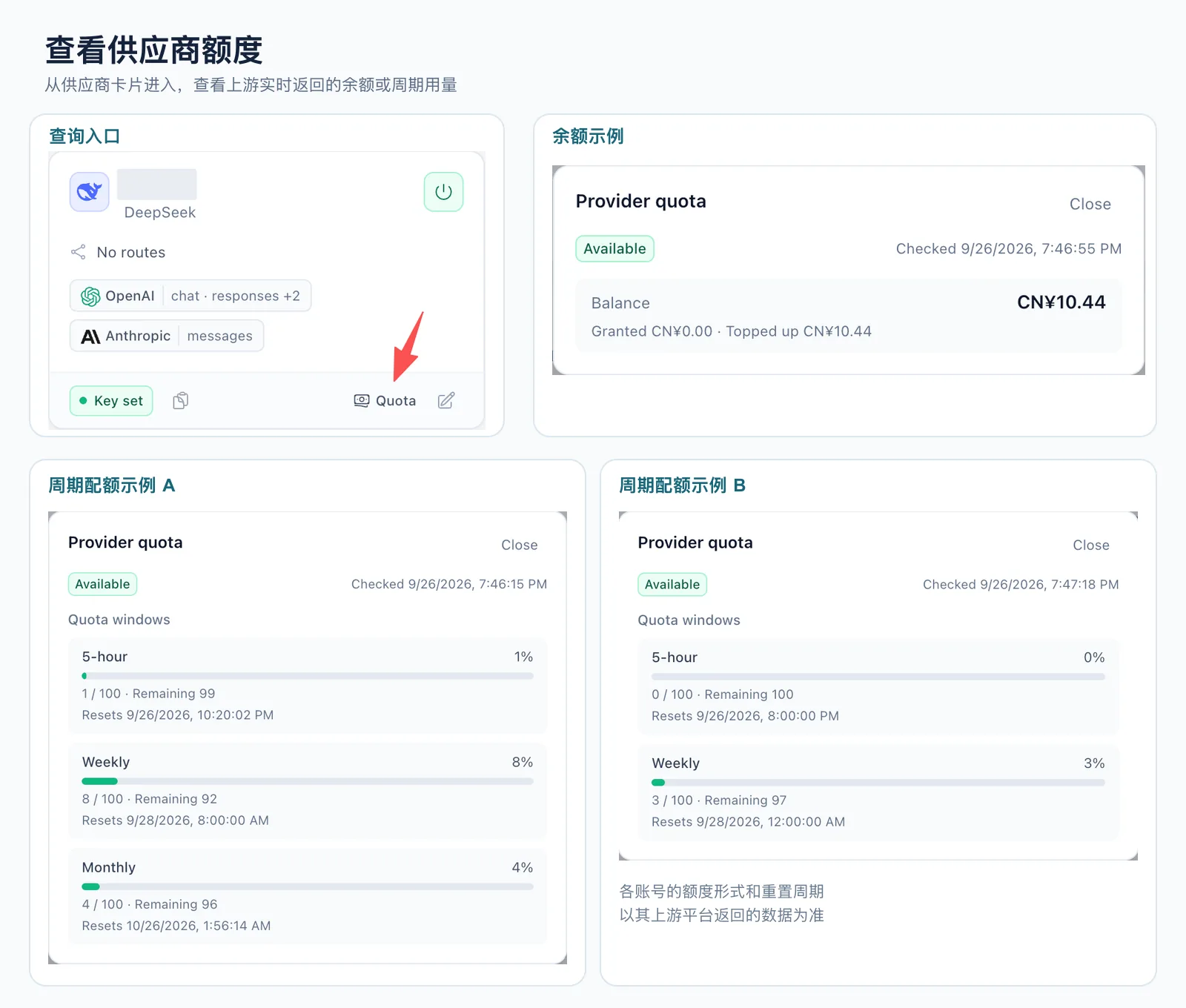
Inspect and refresh
Section titled “Inspect and refresh”- Open a provider with configured credentials.
- For supported account types, inspect balance, plan windows, usage, reset times and the last check result.
- Refresh when needed. On failure, check provider kind, credentials, upstream interface and the check timestamp.
- Combine the result with request errors and reliability metrics before changing fallback routes.
Interpret the result
Section titled “Interpret the result”Pay-as-you-go accounts may report money; Coding / Token Plans may expose five-hour, weekly or other subscription windows. Use the units and windows returned by that provider. Different platforms’ values are not directly additive.
Some platforms require a separate management credential or have no stable quota interface. Missing quota data does not mean inference is unsupported; a successful quota check does not guarantee access to every model either.
Quota support depends on the gateway version. After upgrading, verify the checks available for that release and account type.
See Providers for account setup and billing for user allowances. Supported checks follow the Admin API and the matching implementation revision.