
Routing
Open Inference → Routes. A client request resolves a Request Surface by model, route group, protocol, and operation; the Surface points to a Route Pool; the Pool contains concrete Upstream Targets. Chat, Responses, Images, Audio, and other operations can therefore use independent failover pools and strategies.
The workspace provides Overview and By model views, plus an Unrouted models section for models without an active request surface. Status, kind, route-group, vendor, and Provider filters are reflected in the browser address bar so you can share the same view.
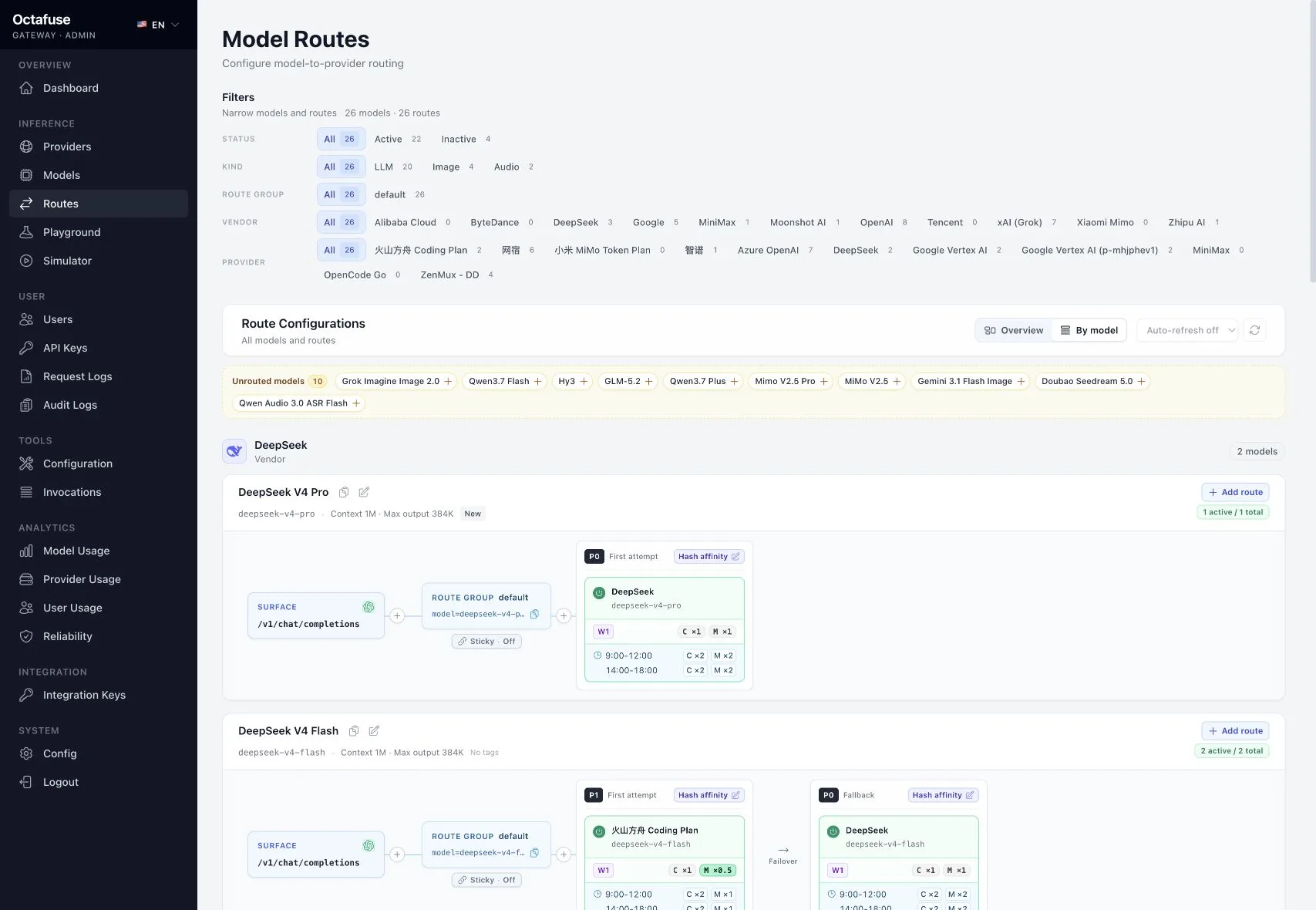
What to do in Admin
Section titled “What to do in Admin”- Open Routes.
- Request Surface: choose the client model and
route_group(oftendefault), then the incoming protocol / operation, such asopenai.chat,openai.responses,anthropic.messages, oropenai.images.generations. Gemini streaming and non-streaming routes both usegemini.models.generate. - Route Pool: point the Surface to a failover pool. Set a Pool default strategy, or click a priority-tier strategy chip to override only that tier; unset values continue through the model / global inheritance chain.
- Upstream Target: choose a Provider, upstream model name and operation, then set priority (higher tries first), weight, and status.
- Custom params: add Provider-specific extensions or route defaults when needed. They are deep-merged into the upstream request body, with explicit client fields taking precedence.
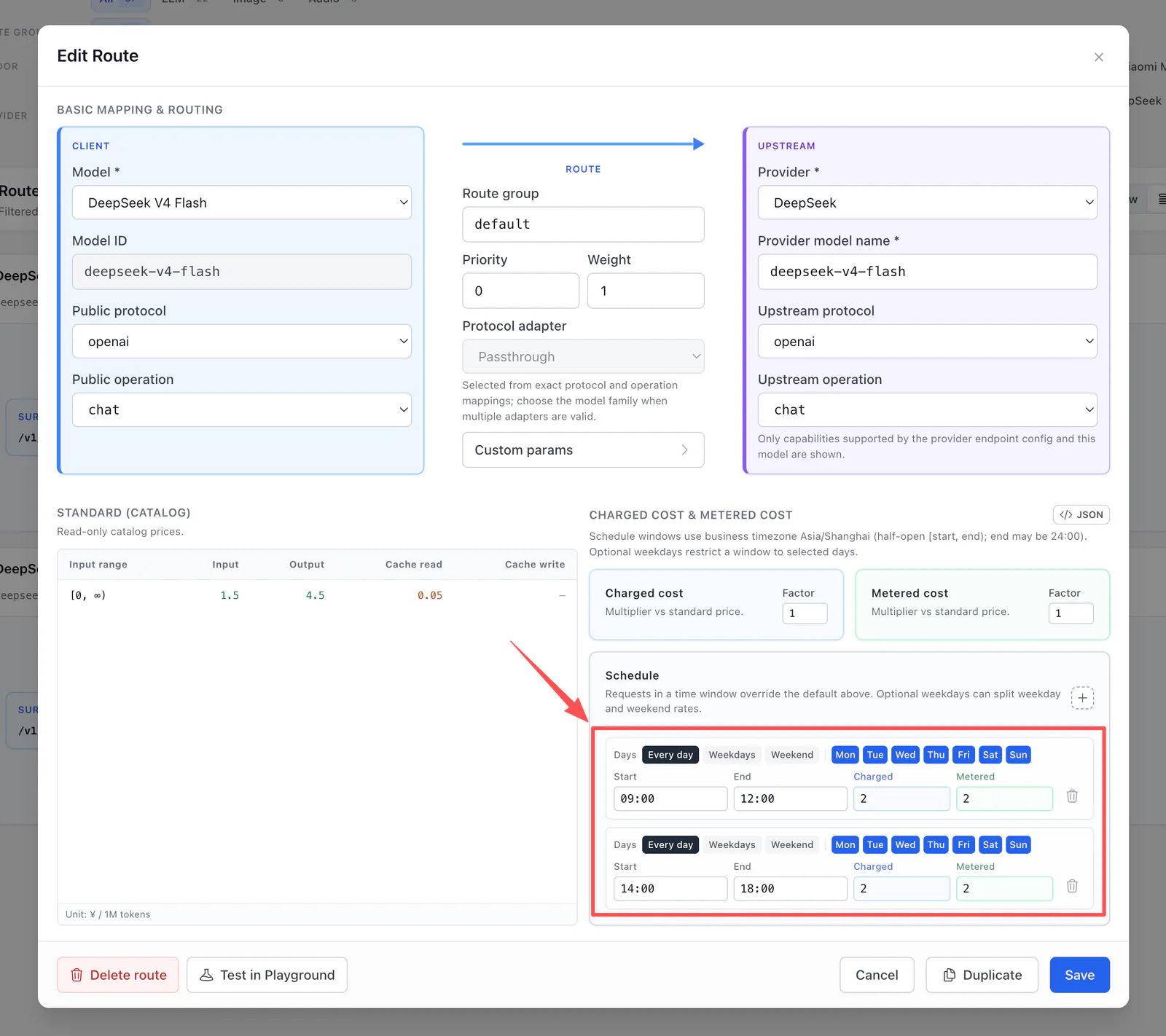
- Billing: set default charged to user and supplier cost factors on the Target. Add a Schedule for vendor peak / off-peak pricing and optionally restrict each window to selected weekdays. A matching row overrides the defaults; its timezone comes from System config.
- After saving, use Playground for a single-route upstream check; use Simulator to exercise the full Proxy path with a real
sk-key.
Default factors, weekdays, and schedules
Section titled “Default factors, weekdays, and schedules”Starting in 2.6.0, Daily schedules saved by Admin use schedule.mode: "override":
- Outside every window, the Target’s default Charged / Metered factors apply.
- Inside a matching window, that row’s Charged / Metered factors apply directly instead of multiplying the defaults.
- Both sides share start and end times but can use different Charged and Metered factors.
- Existing data without
schedule.modekeeps the historical “default factor × window factor” behavior. - Starting in 2.7.0, each window can use Every day, Weekdays, Weekend, or individual day selection. Existing windows without a weekday restriction continue to run every day.
- In the Admin API,
daysuses ISO weekday numbers:1is Monday and7is Sunday. - A cross-midnight window belongs to its start day. Friday
22:00–06:00, for example, covers Friday night through 06:00 Saturday.
Gateway evaluates the window at request entry using the business timezone. A long stream does not change factors when it crosses a window boundary.
Client impact
Section titled “Client impact”Clients only send model and protocol-specific payloads — no hard-coded vendor details. Use a base model id, or baseId:group to select a route group.
Ordering and four strategies
Section titled “Ordering and four strategies”Pools first group Targets by priority descending; higher numbers try first. Within one priority tier, the effective strategy orders Targets using weight:
| Strategy | Behavior and use |
|---|---|
hash_affinity (default) | Keeps a stable preferred Provider for the same user, model, group, and protocol, improving Prompt Cache hits; short-term traffic may be uneven. |
weighted_random | Weighted random distribution with strong load balancing for proportional allocation or A/B; weaker cache affinity. |
weight_priority | Fixed high-to-low weight order for predictable primary / backup behavior; the first Provider gets most traffic. |
weighted_round_robin | Weighted rotation for more even traffic; counters are per runtime instance and not globally synchronized. |
Use different priorities for hard primary / backup across Providers. Precedence is: current priority-tier override → Route Pool default → model capability rule → model protocol rule → model default → global ROUTE_STRATEGY → hash_affinity.
Provider Sticky
Section titled “Provider Sticky”Provider Sticky is cross-request success memory at the Route Pool level, not a fifth ordering strategy:
- Without a valid binding, routing still follows priority plus one of the four strategies above; a successful Target is then recorded.
- A valid binding is tried before priority tiers during its idle TTL. The default is 3600 seconds and each successful request renews it.
- 429, 401 / 403, 5xx, 524, and network failures clear the binding before normal failover. A 400, 404, or image client abort keeps it.
- Sticky is off by default. Open the Sticky dialog on the Route Group / Pool node in Routes Flow to enable it, adjust TTL, compare binding share with route weight, unbind one user, or invalidate the whole Pool.
hash_affinity is stateless hashing that gives a user a stable preferred Provider. Sticky persists the last successful Target in D1, Postgres, or MySQL and shares it across Worker isolates or Node instances.
Failover and circuits
Section titled “Failover and circuits”Retryable 429, 401 / 403, 5xx, and network errors move to the next Target. Providers enter error-specific cooldowns. If every candidate is circuit-open, Proxy returns 429 with Retry-After.
Playground directly probes one Target and bypasses Pool strategy, failover, user billing, and request logs. Validate the full behavior with real Proxy calls or Simulator. Image routes must use the OpenAI protocol — see Image generation / edit.