
OctaFuse 2.21.0: more MCP clients connect directly, default request parameters per provider, upstream model lists in the route editor
Published
OctaFuse Gateway 2.21.0 is about three things: more MCP clients can connect straight to your Gateway; providers can carry default request parameters so you do not repeat them on every route; and the route editor can pull a provider’s upstream model list instead of making you copy model names by hand.
The provider and model import catalogs now load from the website by default, the admin console adds failed-login lockout, the route configuration page has been redesigned, and the Playground and Simulator show the request actually sent upstream.
This release has two required database migrations, 0037 and 0038, which only add nullable columns or columns with defaults. After upgrading, existing behavior is unchanged by default.
01 | MCP authorization: more clients connect directly
Section titled “01 | MCP authorization: more clients connect directly”2.20.0 made the Gateway its own OAuth authorization server. This release keeps improving client compatibility so clients such as Claude Code, Cursor and VS Code can connect:
- Confidential clients: dynamic registration supports confidential clients and returns a
client_secretthat is shown only once. The token and revocation endpoints acceptclient_secret_basicandclient_secret_post, and confidential clients may skip PKCE. - Manually issued credentials: for clients that cannot register dynamically, issue fixed credentials in the admin console, reset the secret or delete the client when needed. The client list can be filtered by registration method and shows whether a secret is configured.
- More presets: Claude Code, Cursor, VS Code, Gemini CLI and local MCP client presets are new, and WorkBuddy gains its callback domains. Import them in one click.
- More flexible callback rules: subdomain wildcards and trailing
*prefix matches are supported, with exact addresses taking priority. Locallocalhostcallbacks accept dynamic ports just like127.0.0.1. - Discovery paths:
/.well-known/oauth-authorization-server/mcp[/{slug}],/mcp/.well-known/oauth-authorization-serverand related paths are added, and the 401 from/mcpdeclaresscope="mcp", so clients can find the authorization entry on their own. - CIMD: to identify clients by an HTTPS metadata document, enable it on the OAuth card or set
MCP_OAUTH_CIMD_ENABLED=true. It is off by default.
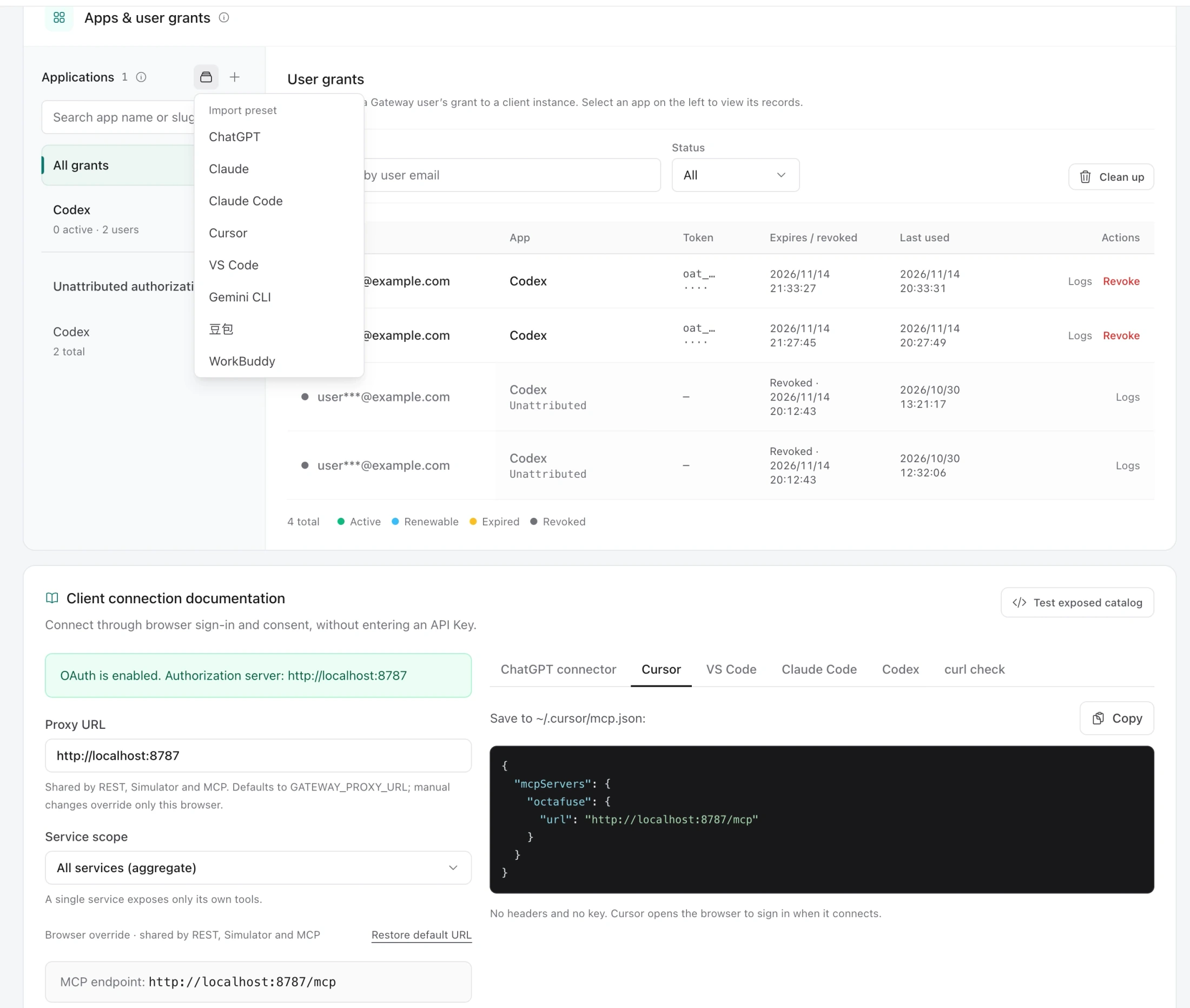
MCP servers → Client access → OAuth 2.0. The “Import preset” menu now lists Claude Code, Cursor, VS Code and Gemini CLI. The client connection guide below gives a configuration per client; the Cursor mcp.json is shown. User emails are masked and tokens show only a prefix.
When a client fails to register, search the logs for registration rejected; it usually means the callback address matched no application. If you use a reverse proxy, also confirm /.well-known/oauth-authorization-server* is forwarded. See MCP OAuth authorization for the steps.
The MCP services page also gains a better catalog review: compare tool definitions and parameter schemas item by item, accept, enable or skip and move on to the next, or accept changes and enable new entries in bulk.
02 | Default request parameters per provider
Section titled “02 | Default request parameters per provider”Many upstreams need fixed headers or body fields, such as a custom header or fixed sampling parameters. You used to fill them in on every route. The provider dialog now has a “Custom parameters” tab:
- set default headers and body per upstream protocol;
- a route can still override them, and route settings win over provider settings;
- protected headers and the
modelfield stay managed by the gateway and are never overridden; - native passthrough and WebSocket entry points also send the configured headers.
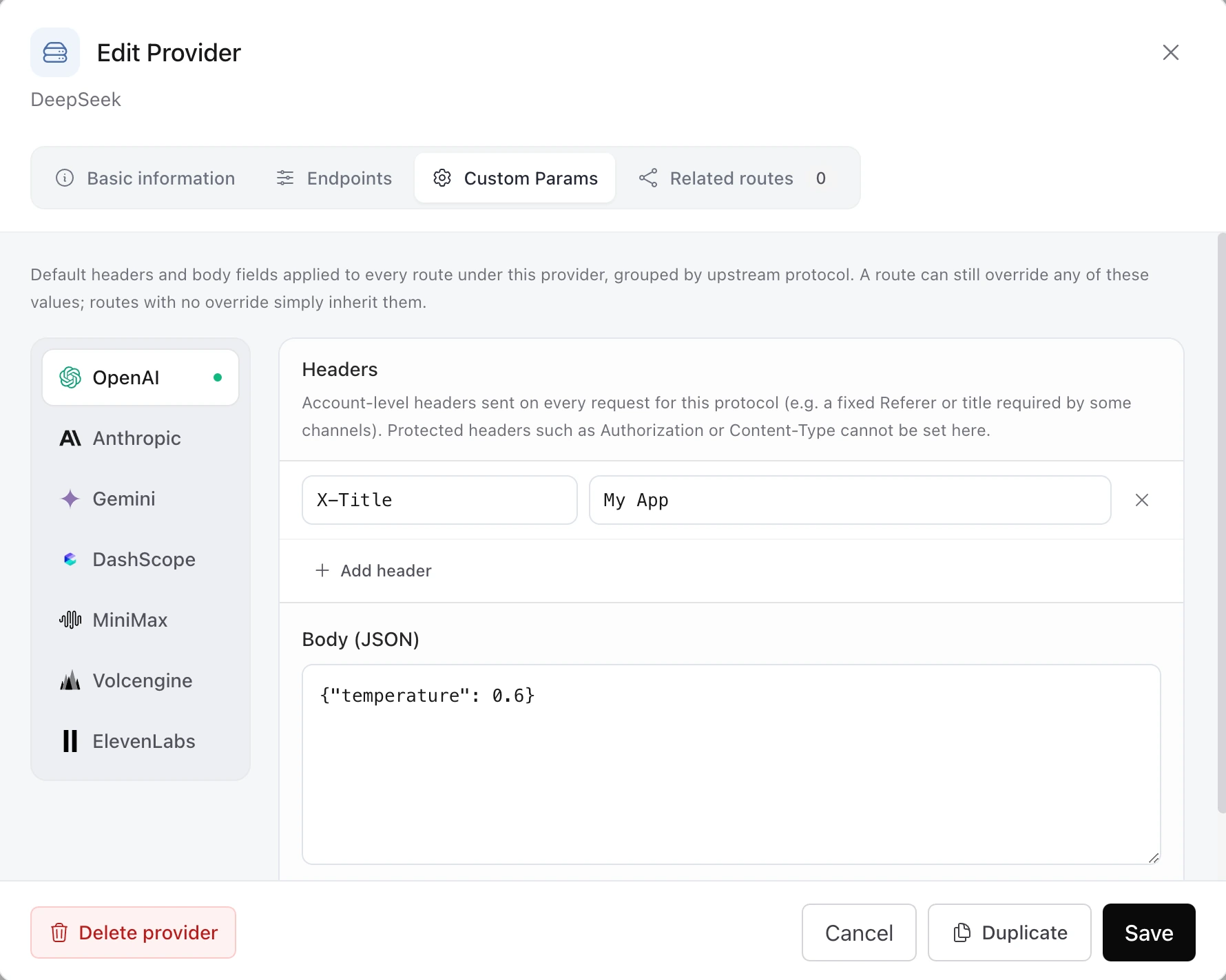
The “Custom Params” tab in the provider dialog. Switch the upstream protocol on the left and set default headers and body on the right. The X-Title header and temperature field shown are example values and were not saved.
The Playground preview and live requests use the same merge logic, so you can see what will be sent upstream before saving. See Providers.
03 | Route editor: pick upstream models directly
Section titled “03 | Route editor: pick upstream models directly”When you create or edit a route, click “Provider model name” and the Gateway loads the upstream model list for the selected provider. Search by model ID or display name in the dropdown. Up to 1000 candidates are returned, limited to those matching the route’s operation type.
- You can still type any ID. If the provider has no usable list endpoint, or the key is not filled in yet, manual entry remains.
- Candidates only help you fill the field and do not mean your account may call them. Refreshed results are not stored.
The route configuration page itself was redesigned too:
- Filters: models and providers support search, grouped multi-select and removing items one by one, and filters can be shared by link;
- Layout: cards and lists under “By model” switch between compact and flat layouts, and the browser remembers your choice;
- Prices: every applicable time window is always shown row by row with the active one highlighted, and multipliers switch between effective and original;
- Copy: the call path and model ID can be copied directly; click a model name to edit the model, or the plus next to the title to add a provider for the current entry.
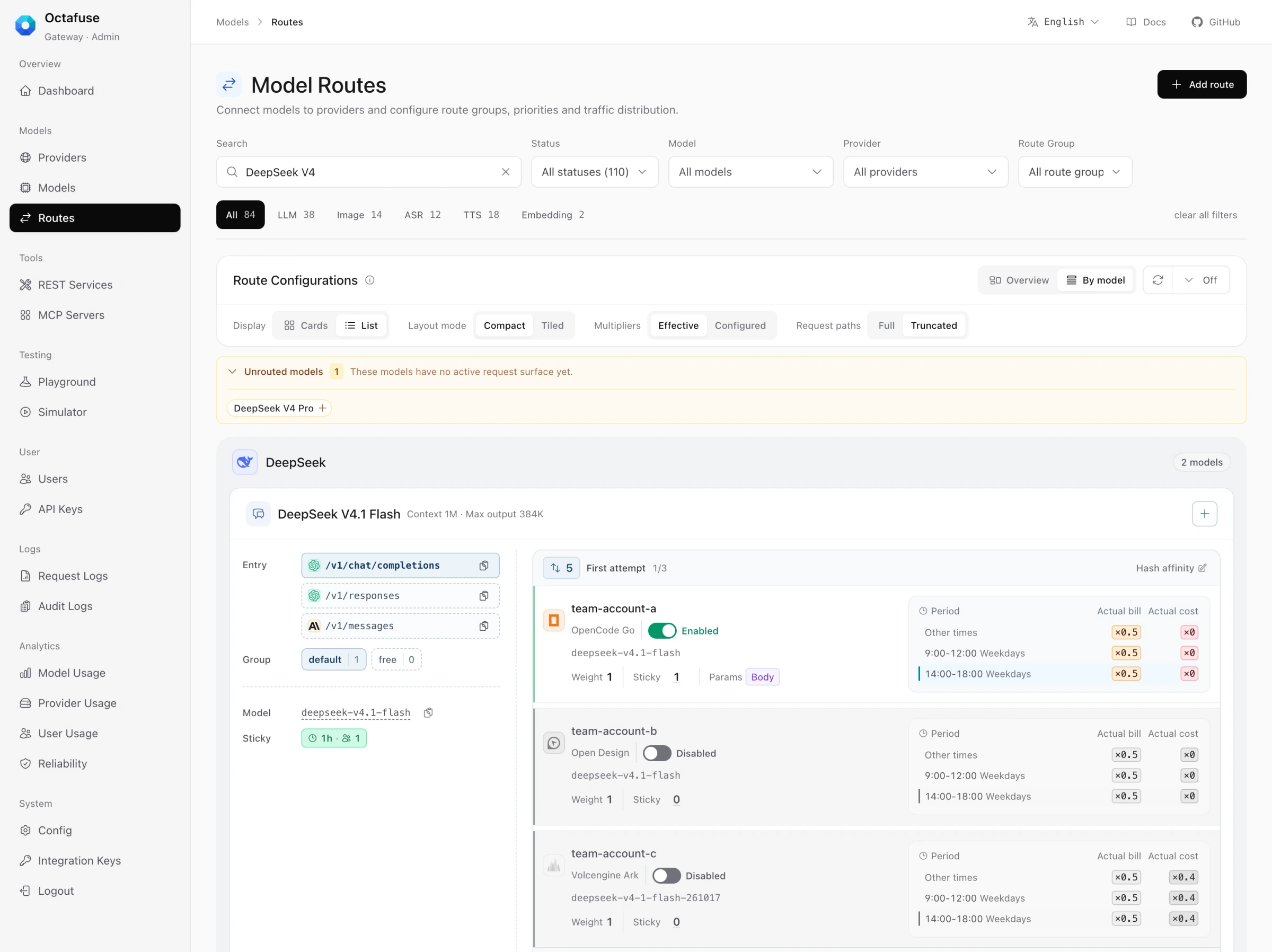
The route configuration page, searched for DeepSeek V4. The left shows request entries, route groups and sticky settings. The right lists upstreams layered by priority, routes with request parameters carry a “Params” tag, and prices are shown per time window with the active window marked by a blue bar. Account names are replaced with generic ones.
04 | Import catalogs load from the website
Section titled “04 | Import catalogs load from the website”The provider and model import dialogs now load the catalog from https://octafuse.dev by default, so new templates and models appear without waiting for a Gateway release. Model import gains a “Model vendor” filter that combines with category, search and lifecycle filters.
Two things to note:
- Private networks or offline: the Admin process must be able to reach that site over HTTPS. Otherwise point
CATALOG_BASE_URLat your own catalog mirror, which must serve/api/catalog/providers,/api/catalog/modelsand/api/catalog/models-by-vendor/{vendor}, or the import dialogs cannot load the catalog. - Import stability: provider import now uses the template’s English name as a stable key, so a reordered remote catalog cannot import the wrong entry. Requests that still carry an old index return
409; reload the catalog and select again.
05 | Other admin console changes
Section titled “05 | Other admin console changes”- Failed-login lockout: after 5 consecutive failed logins within 30 minutes from the same source or against the global admin account, new login requests cool down for 30 minutes and the login page shows a countdown. Counters live only in the Admin process and reset on restart; existing sessions, admin API keys and the proxy are unaffected. Automation that retries with a wrong password will trigger the lockout.
- Playground and Simulator: the Playground previews headers and body using the live rules, shows whether each setting comes from the provider or the route, and displays the upstream request returned by the server after sending. The Simulator compares the input JSON with the gateway request. After a language-model call, view the redacted upstream snapshot and effective settings by request ID.
- Provider list: a new “Status” column on wide screens, tighter cards, and missing or empty keys are more visible.
- Gemini signature retry: when the upstream returns
Corrupted thought signature, the gateway clears thought signatures from the session history and retries the same upstream once.
06 | Model catalog and provider templates
Section titled “06 | Model catalog and provider templates”Already imported models are not overwritten, and importing does not attach routes automatically; import new models by hand and configure routes. Prices below are per million tokens, and CNY catalog prices for Gemini and GPT are converted from USD list prices at ×7.
| Model | Notes |
|---|---|
| Gemini 4 Neon | gemini-4-neon, multimodal input, 1M window, synchronous output defaults to 64K. Input $3, output $15, implicit cache $0.15. Thinking defaults to high and cannot be turned off; passing minimal or thinking_budget returns 400. |
| GPT-6.2 Astra / Sol | gpt-6.2-astra and gpt-6.2-sol, 1.05M context and 128K output. Astra input $8, output $40; Sol input $2, output $10. Above 272K input tokens, input and cache prices double and output is 1.5×. Tool calls require the Responses API, and neither accepts reasoning.effort=none. |
| Hy4 flash | hy4-flash, 1M context and about 64K output. China input ¥0.5, output ¥2; international input $0.07, output $0.281. Catalog prices exclude the TokenHub 50% discount valid through 2026-11-30. hy4-preview is marked to retire on 2026-12-07. |
| Qwen4 Max | qwen4-max general release, 1M context and 128K output, default thinking level high. China input ¥10, output ¥30; international input $1.5, output $4.5. qwen4-max-preview catalog prices now match the general release, and the official preview period ran until 2026-11-25. |
Provider templates:
- OpenCode: the Zen and Go import templates now use
https://opencode.ai/inferenceandhttps://opencode.ai/inference/go. Existing providers are not updated automatically; change the address by hand. - Modelink: a new overseas template for Qiniu AI (
api.modelink.ai) pre-fills OpenAI Chat, Responses, Images, Anthropic and Vertex-compatible Gemini endpoints. Mainland China keeps using the “Qiniu AI” template.
See the model catalog for full specifications and cache prices.
Upgrade notes
Section titled “Upgrade notes”Upgrading from 2.20.0 to 2.21.0 requires migrations 0037 and 0038 first. D1, Postgres and MySQL all have scripts, and they only add columns, so existing data is unchanged.
- Back up the database, then apply 0037 (OAuth client credential fields) and 0038 (the nullable provider
custom_paramscolumn). - Update the Proxy, Admin and migrate images to the same version, then restart in a rolling fashion.
- After upgrading, spot-check MCP client authorization, provider custom parameters, route editor model candidates and the import dialogs.
Also note:
- Catalog outbound access: Admin loads import catalogs from
https://octafuse.devby default. For private or offline deployments setCATALOG_BASE_URLbefore upgrading. Optional variablesCATALOG_TIMEOUT_MSandCATALOG_TTL_MSare covered in Docker deployment. - Login lockout: automation that retries with a wrong password is locked out for 30 minutes.
- OpenCode: addresses of existing providers are not updated automatically.
- CIMD:
MCP_OAUTH_CIMD_ENABLEDis off by default, and behavior is unchanged unless you enable it.
See GitHub Release v2.21.0 and the changelog for the full list, and Upgrades and migrations for the upgrade steps.
If OctaFuse helps your project, please give it a Star on GitHub. Your feedback helps us keep improving routing, protocol support, and the self-hosted experience.