
OctaFuse 2.20.0: sign in to MCP with your own accounts, and tool calls in Request logs
Published
OctaFuse Gateway 2.20.0 is about MCP authorization: the Gateway can now act as the OAuth authorization server itself. When you offer the Gateway’s MCP services to outside users, they click connect in a client such as ChatGPT, Claude or Codex, sign in with your business system’s account and approve, and they are ready to go without copying an API key. Your business system only handles sign-in and consent and no longer stores any OAuth state.
Two more changes you will use every day: Request logs absorb the former Invocations page, so model requests and tool calls are viewed together with multi-select filters by type, model and provider; and web search, web fetch and deep search gain a DeepSeek engine.
This release has one required database migration, 0036, which only adds tables and nullable columns. After upgrading, the built-in authorization server stays off and existing MCP access keeps working unchanged.
01 | MCP authorization: sign in with your own accounts
Section titled “01 | MCP authorization: sign in with your own accounts”When 2.18.0 introduced MCP OAuth, the Gateway was only a resource server. You had to run your own authorization server for client registration, token issuance and refresh, and have it issue gateway access tokens through the Admin API. This release moves all of that into the Gateway.
The flow now looks like this:
- A user adds your Gateway address in an MCP client and clicks connect.
- The client registers with the Gateway automatically, and the browser opens your business system’s sign-in and consent page.
- The user signs in with their business account and approves. The client receives a token that can only access MCP and starts calling tools.
- Tokens expire hourly and the client refreshes them automatically, so users do not sign in again. Usage is charged to the user’s gateway account.
On your side, the business system only needs a sign-in and consent page. It receives the request_id the Gateway appends, confirms the user is signed in, and reports the user’s approval or denial to the Gateway with an integration key that has the oauth.consent permission. If you do not want to wire up your own site yet, start with the built-in page, where users approve with their own API key.
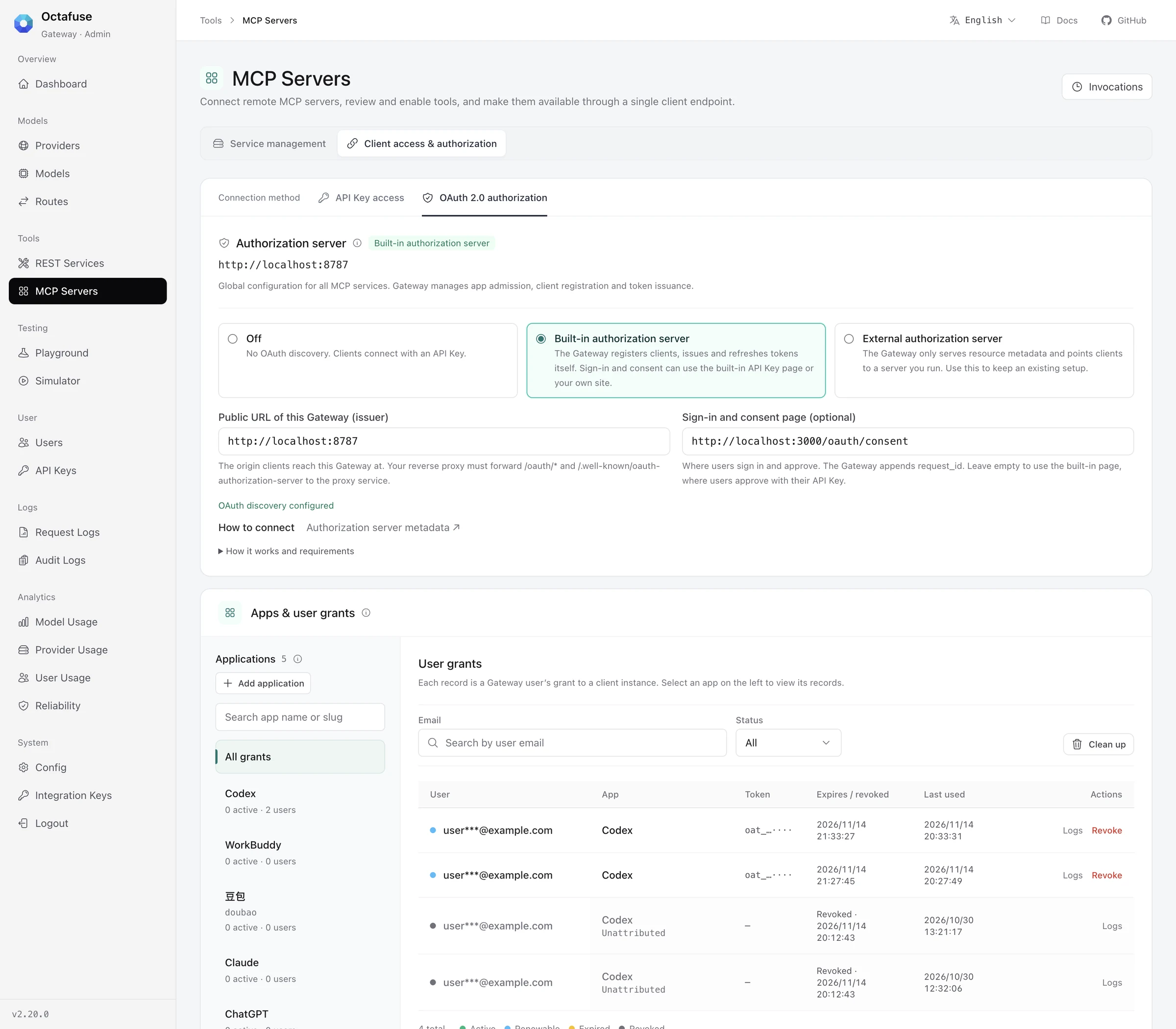
MCP Servers → Client access → OAuth 2.0. The card has Built-in authorization server selected. Below it, the application directory is on the left and the user grants for each application are on the right. User emails are covered and tokens show only their prefix.
The OAuth card under Client access on the MCP Servers page now offers three modes:
| Mode | When to choose it |
|---|---|
| Built-in authorization server | Recommended. The Gateway handles client registration, token issuance and refresh; your business system only does sign-in and consent. |
| External authorization server | You already run your own authorization server and want to keep it. |
| Off | No OAuth; clients connect with an API key. |
The Applications directory decides which clients may connect: each client is matched to an application by its redirect URI, and clients with no matching application cannot register. Presets for ChatGPT, Claude, Codex, Doubao and WorkBuddy import in one click. You can then see how many users and client instances use each application, and disable an application or revoke all of its grants at any time.
Deployments switching from an external server will see existing grants stop working once their access tokens expire; users simply authorize once more. To go back, switch the card to External authorization server, which takes effect immediately. See MCP OAuth authorization for the setup steps.
02 | Request logs: model requests and tool calls together
Section titled “02 | Request logs: model requests and tool calls together”REST and MCP tool calls used to live on a separate Invocations page, so investigating one agent task meant switching back and forth. This release merges it into Request logs, and a new Logs group in the sidebar holds Request logs and Audit logs. The old Invocations address redirects with its filters.
Type, Model and Provider are now two-level multi-select filters, and selections are combined:
- Type splits into models (LLM, image, ASR, TTS, embeddings) and tools (each REST tool and each MCP server), so you can, for example, view image requests together with one search tool’s calls.
- Model is grouped by vendor and Provider by kind. Select a whole group or just a few items.
- Filters are linked: when the scope contains only tool calls, model, provider and route-group filters are disabled automatically.
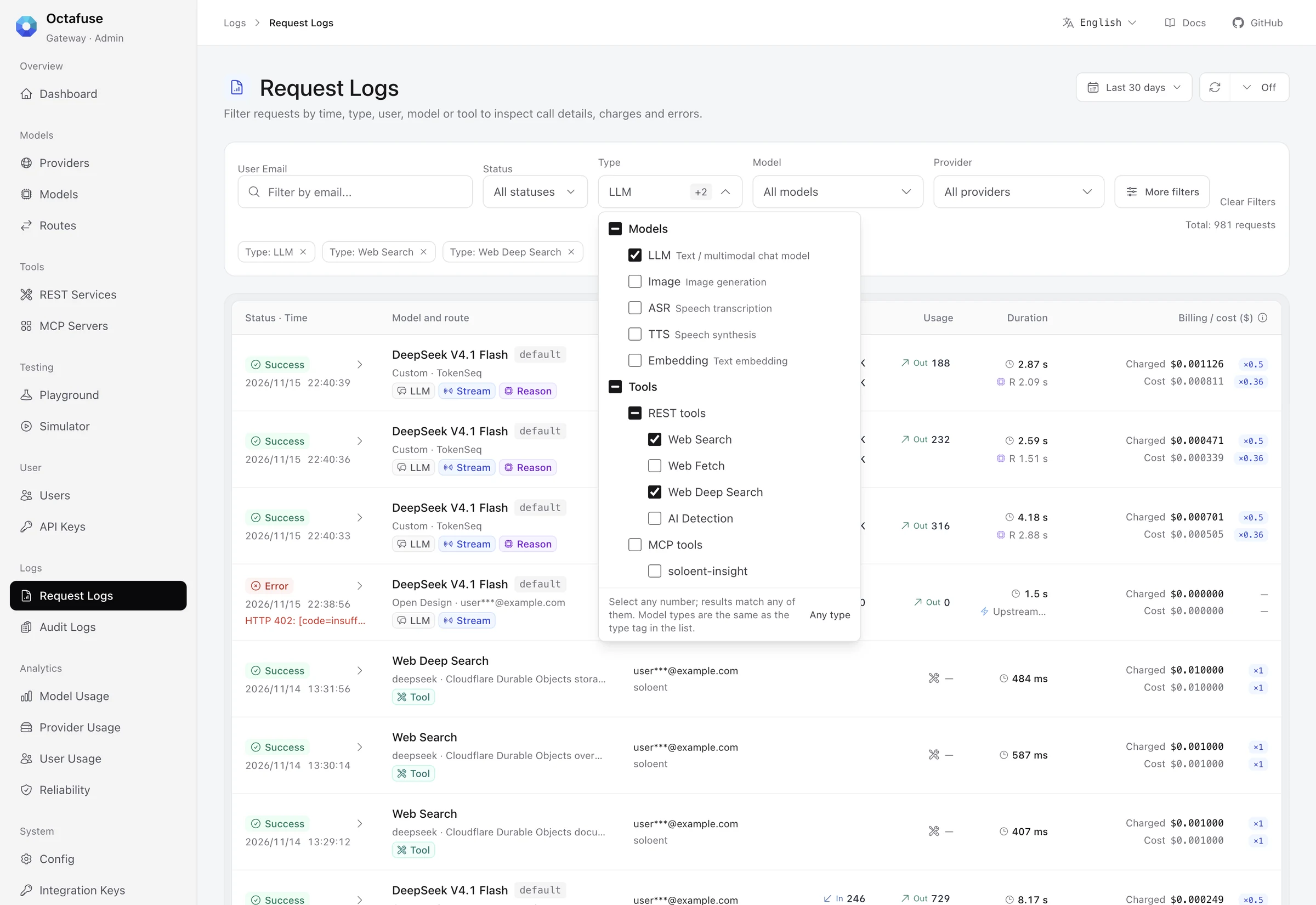
The Type filter is split into models and tools. With LLM, Web Search and Web Deep Search selected, the chosen conditions appear as chips under the filter bar, and model requests and tool calls show up in the same list. User emails are covered.
Tool call details no longer reuse the model request flow. They show an overview, request, response and accounting: REST tools show the engine, request parameters and search results, and MCP tools show the server, upstream tool, arguments and returned content. When a call fails, the top of the detail shows the original error and what to check, with a link to the tool configuration or MCP server.
To watch live traffic, turn on auto refresh (10 seconds to 5 minutes). New entries slide in and briefly highlight; while you are reading the list, you are told about new entries first instead of losing your place.
03 | DeepSeek engine for search and fetch
Section titled “03 | DeepSeek engine for search and fetch”Web search, web fetch and deep search add a DeepSeek engine that connects to DeepSeek’s standalone Search and Fetch APIs. The public endpoints do not change, so applications already using /v1/tools/* need no code changes.
On the REST Services page, configure the DeepSeek provider for a tool, enter the API key and save, then activate it in the Usage column. Before enabling it:
- Queries are limited to 128 characters; the Gateway truncates longer queries.
- Domain allow and block lists are sent as
site:/-site:when they fit in the query; otherwise the Gateway fetches more results and filters locally. - The upstream list price is $0.75 per 1,000 successful requests. Set your own Standard price and factors; the Gateway still charges per call for empty results.
04 | Dashboard and other Admin improvements
Section titled “04 | Dashboard and other Admin improvements”- Dashboard: adds cost relationships, P95 first-response and request latency, failovers, unhealthy providers and the error mix, with comparison to the previous period of equal length. Live throughput shows RPM and TPM for the last 60 seconds. Clicking a metric opens the matching logs with the same time range. Auto refresh is off by default and can be set from 10 seconds to 5 minutes.
- Navigation: the console consistently uses Models and Tools, and Playground and Simulator move into a new Testing group. Simulator switches between models and tools at the top.
- REST Services: organized into the applied summary, Providers & pricing and integration documentation. The documentation offers copyable cURL and agent tool definitions in OpenAI, Anthropic and other formats.
- MCP Servers: the server directory and details sit side by side, and client access is split into API Key and OAuth 2.0.
- One Proxy address: Admin adds an optional runtime variable
GATEWAY_PROXY_URL. REST docs, Simulator and MCP connection guides share that default Proxy address, which can be overridden in the browser. - Amounts and factors: amounts and factors look the same across the console; amounts keep their currency and precision, factors use a separate badge, and billing results do not change.
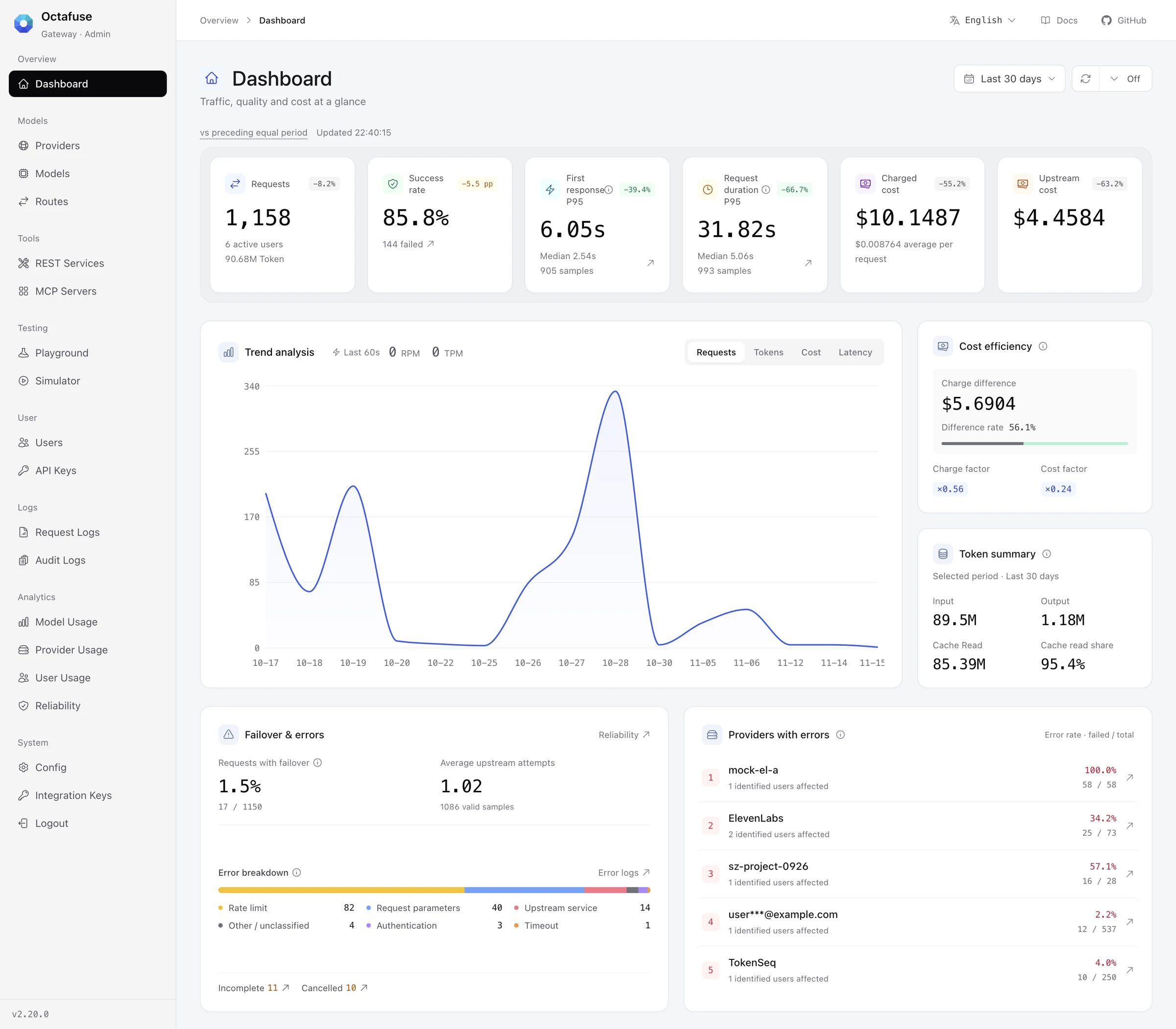
The dashboard over the last 30 days. The top row shows requests, success rate, P95 first response and request duration, charged cost and upstream cost. Below are the trend, cost efficiency, token summary, failover and error mix, and providers with errors. User emails are covered.
05 | Model catalog
Section titled “05 | Model catalog”Imported models are not overwritten and imports do not create routes; import new models and configure routes by hand.
| Model | Notes |
|---|---|
| Gemini 4 Hydrogen | gemini-4-hydrogen (2026-11-12), 1M context, 64K synchronous output, accepting text, images, audio, video and files. One price across the 1M window: input $1.50 and output $7.50 per million tokens, implicit cache reads $0.075. Thinking levels low, medium, high and xhigh, default high. |
| Gemini 4 Carbon | gemini-4-carbon (2026-11-10), 1M context, 64K synchronous output. Recorded at Standard list price: input $4 and output $20 per million tokens, implicit cache reads $0.20. Set limited-time discounts as provider discounts in route pricing. |
| Qwen4 Max Preview | qwen4-max-preview (2026-11-11), 1M context, about 393K maximum output. Available only on Token Plan subscriptions with no published list price yet, so pricing follows qwen3.8-max for now. The preview ends on 2026-11-25 and the catalog records its retirement date. |
| MiniMax H3 Image | minimax-h3-image and minimax-h3-image-highspeed (2026-11-10), billed at official token list prices. China region uses the official RMB prices rather than USD × 7. Use upstream model names MiniMax-H3-Image and MiniMax-H3-Image-Highspeed in routes. |
gpt-image-2 also records OpenAI’s announced shutdown date of 2027-02-10. See the model catalog for full specs and prices.
06 | Security fix
Section titled “06 | Security fix”The Node runtime’s @hono/node-server is upgraded to 2.1.8, fixing request-path backslash parsing and a connection reset during asynchronous WebSocket upgrades. Docker and Node deployments should upgrade soon.
Upgrade notes
Section titled “Upgrade notes”Upgrading from 2.19.0 to 2.20.0 requires migration 0036 first. D1, Postgres and MySQL scripts are provided, and they only add tables and nullable columns. Older Proxy and Admin versions keep working against the migrated database.
- Back up the database and apply 0036.
- Update the Proxy, Admin and migrate images to the same version and perform a rolling restart.
- Spot-check the new Request log filters, tool call details and the MCP Servers page.
Also note:
- Built-in authorization server is off by default: with
MCP_OAUTH_ISSUERempty, behavior is unchanged. To enable it, prepare the application directory, consent page, integration key and reverse-proxy forwarding in each deployment region; see MCP OAuth authorization. - Integration key permissions: keys that call
/api/admin/oauth/*needoauth.read,oauth.writeoroauth.consent. - Invocations: the old
/gateway/tools/invocationsaddress redirects to Request logs, and the newGET /api/admin/request-logsparameters are all optional. - DeepSeek billing: empty results are still charged per call, so set pricing rules before enabling it.
See GitHub Release v2.20.0 and the changelog for the full list, and Upgrades and migrations for the upgrade steps.
If OctaFuse helps your project, please give it a Star on GitHub. Your feedback helps us keep improving routing, protocol support, and the self-hosted experience.