
OctaFuse 2.19.0: A redesigned Admin console and a refreshed model catalog
Published
OctaFuse Gateway 2.19.0 is mostly about the Admin console. It now has one visual style, and the filters, details and forms on the routing, model, provider, log, user and MCP pages have been reorganized. A batch of query and navigation bugs is fixed along the way.
The model and provider catalog is updated too, with 23 new model presets. They include Claude Fable 5.2, Zhipu GLM-5V-Turbo, Tencent Hunyuan HY4 and GPT Image 2.6.
This release has no database migration and adds no new or renamed environment variables or system_config keys. The data plane (Proxy and Core) changes in only two places: Qwen-Audio speech-synthesis adapter matching and Command Code quota lookup. What you need to watch when upgrading is where a few Admin entries moved, and that new catalog entries must be imported by hand.
01 | Admin console: one style, tidier interactions
Section titled “01 | Admin console: one style, tidier interactions”This release is mainly about interface and interaction. The goal is to make everyday actions more direct and the hierarchy of information clearer.
- One visual style: a light-gray workspace, white panels and black primary actions. Headings, filters, tables and status indicators were reworked, and each page uses the available width. The login page and navigation use the new blue-teal Octafuse mark.
- Dialogs and forms: edit, detail, import, pricing and confirmation dialogs share one layout and keyboard focus behavior, and forms now ask before you discard an unsaved draft. Pages adapt to narrow screens, all four languages (English, Chinese, Japanese and Korean) and the reduced-motion setting.
- Top bar: the language switcher moved to the top right, next to the Docs link.
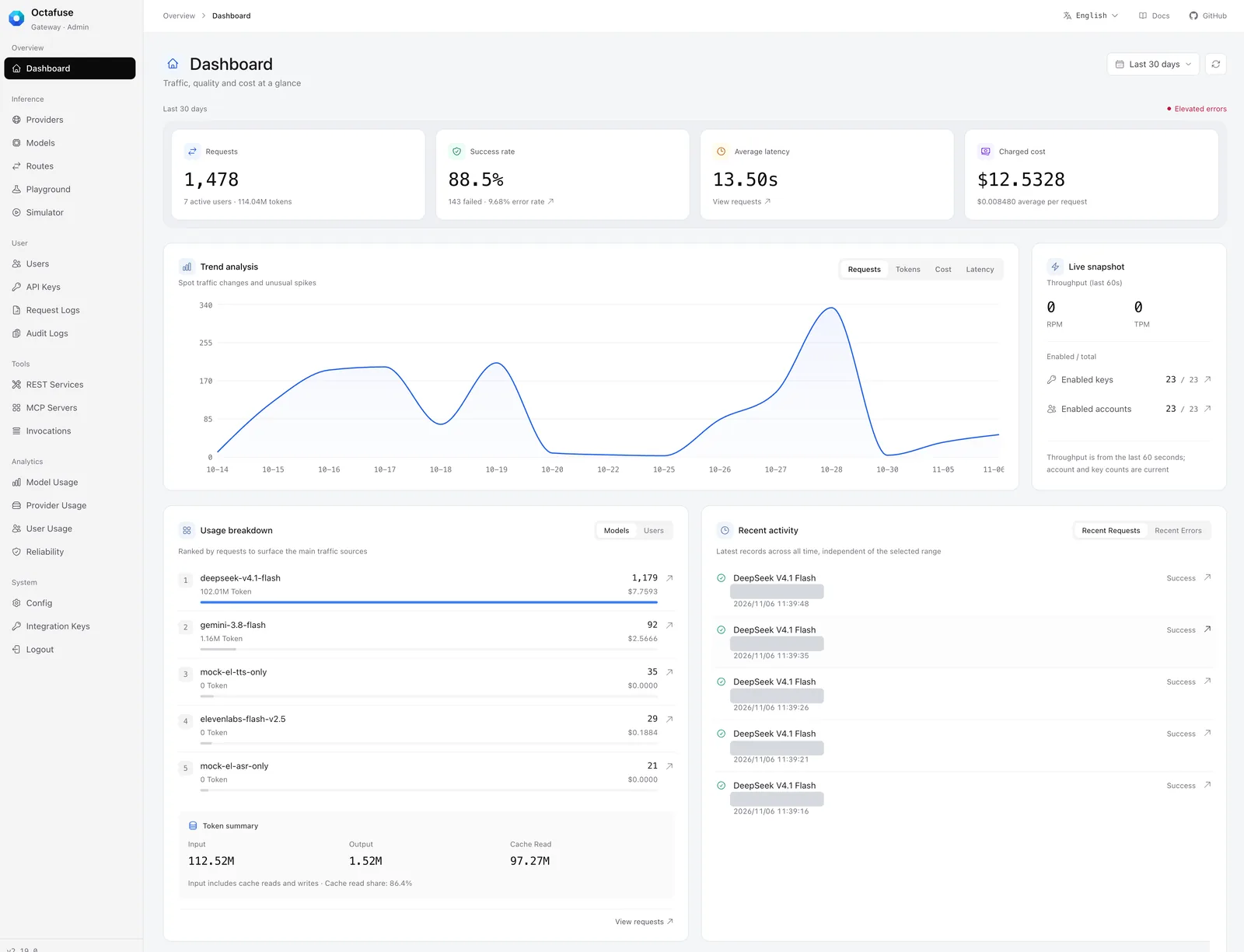
The dashboard in the new style, over the last 30 days. Token summary and Recent activity at the bottom are new; user emails are covered.
The overview cards now sit in one row at equal height, and the dashboard adds a Token summary for input, output and cache-read tokens, plus Recent activity and Live snapshot panels. Recent activity shows the latest records across all time and does not follow the selected range. Throughput in the live snapshot covers the last 60 seconds.
02 | Where things moved
Section titled “02 | Where things moved”After upgrading, a few entries are in different places. Tell the other administrators on your team about the first two.
| Item | 2.18.0 | 2.19.0 |
|---|---|---|
| Maintenance mode | System → Maintenance in the sidebar | The Maintenance mode section of System → Config. The old address redirects. |
| Integration Keys | Its own Integration group | Moved into the System group |
| Global config | A single page | Four sections: General, Routing & billing, Notifications and Maintenance mode. Each setting is still saved separately. |
| Catalog updates | Check official updates on the Models and Providers pages | One Sync button: it compares first and applies only after you confirm |
Maintenance mode
Section titled “Maintenance mode”Maintenance mode works as before: during maintenance, inference requests get a 503, while health checks and read-only endpoints stay available. What changed is how the form is organized. It now brings the duration, the message and the affected requests together on one page, and it states that inference requests return HTTP 503 while health checks and read-only lists are unaffected.
Two things to keep in mind. A custom duration must be a whole number of minutes, at least 1. And the expected duration is only a hint for clients: maintenance does not end automatically when it runs out, so you still end it by hand.
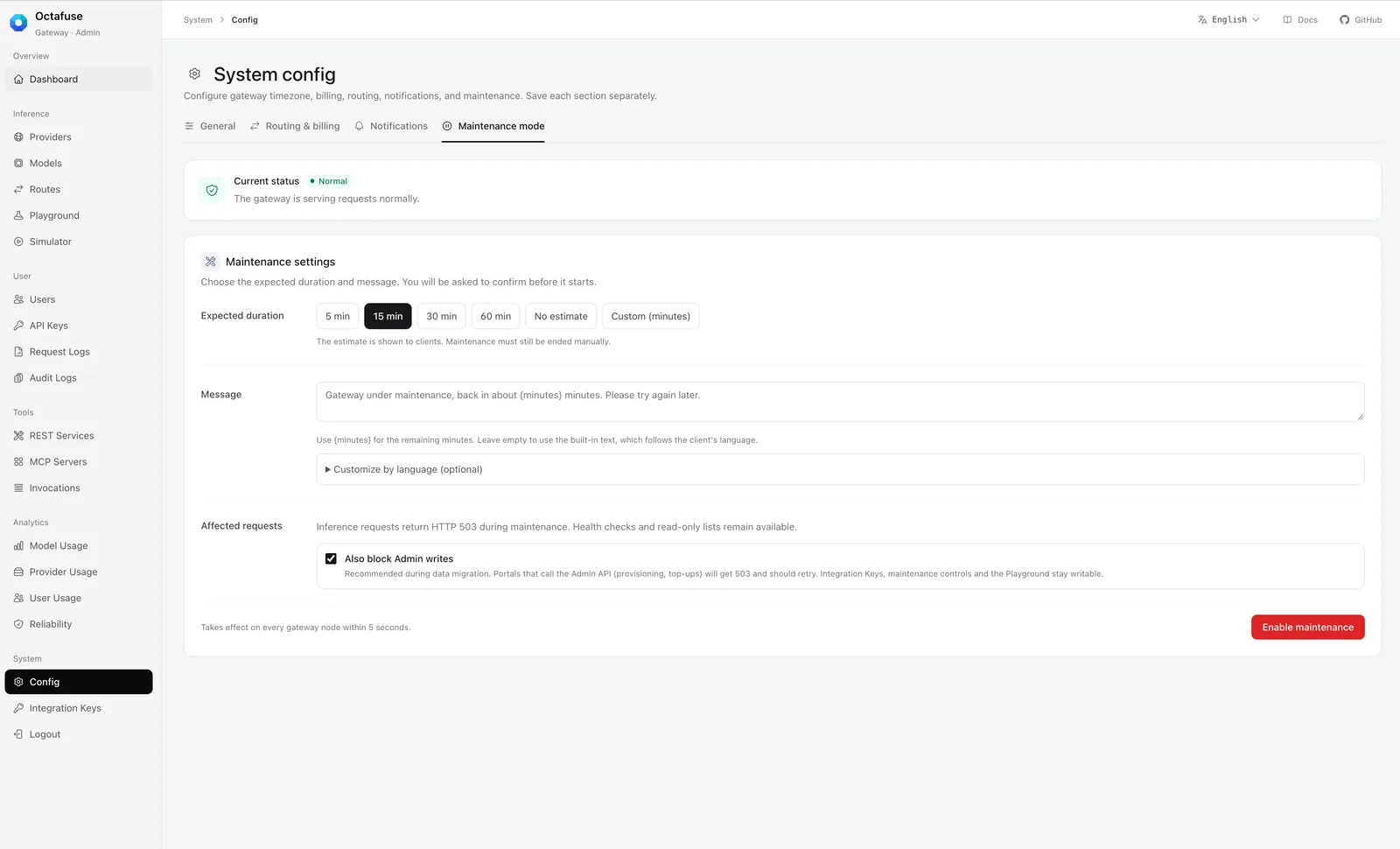
Maintenance mode now lives in a section of the Config page. Maintenance is off in this screenshot. The text under Expected duration reads: the estimate is shown to clients, and maintenance must still be ended manually.
Syncing with the official catalog
Section titled “Syncing with the official catalog”The Models and Providers pages now share one Sync button. It compares your data with the official catalog first and applies changes only after you confirm. Results are shown in one place. Models and providers you already imported are not overwritten, and prices keep their current values by default. Duplicate status messages on the page were removed.
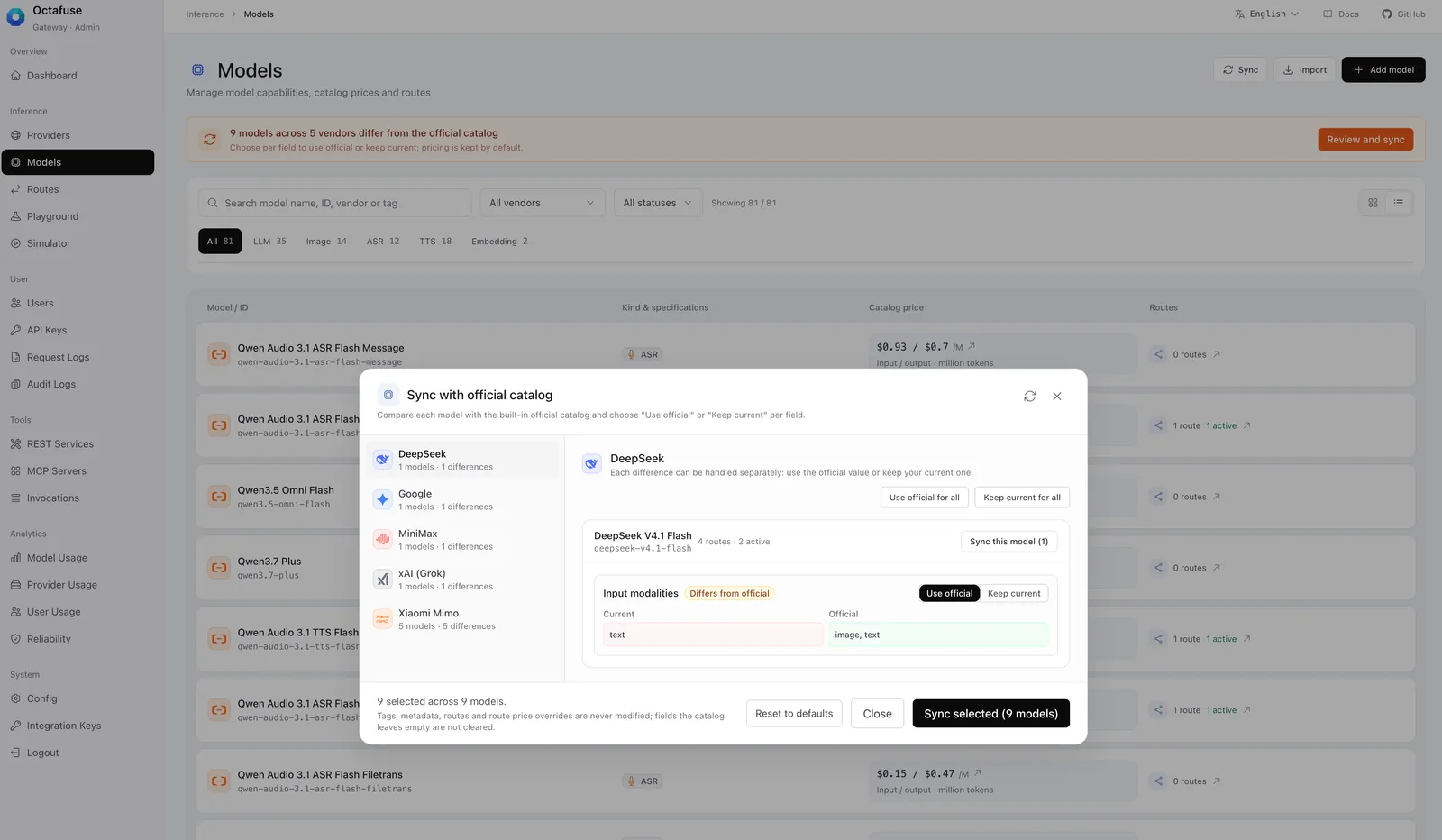
After you click Sync, the differences are compared first. The banner at the top says pricing is kept by default, and the dialog says tags, metadata, routes and price overrides are never modified.
03 | What changed on each page
Section titled “03 | What changed on each page”Only the changes people are most likely to notice in daily work are listed here.
- Providers and models: Import and create sit in the page header. The Models page can search by name, ID, vendor or tag, and the import dialog merges name and ID. Embedding models show only an input price, and schedule pricing that is not configured stays collapsed.
- Routes: The page separates request surface, route group, provider and cost comparison per model. Rarely used filters, factors, paths and sticky-refresh preferences moved into a dialog. Ready routes only means that both the route and its provider are enabled; it does not reflect live health. Image and speech units follow the billing configuration.
- Playground and Simulator: The layout of connection, target, request and response was tidied, and the Simulator gains a key filter. While a request is in flight, its connection and target are locked.
- Users and API Keys: The user list focuses on identity, status and quota, and the full user ID moved into the details. When creating a key you can search for an existing user, type a user ID or use an external identity. Keys are masked by default.
- Request Logs: Common filters sit on top and advanced conditions below. The time picker supports the business timezone, an open-ended range on either side, or all time, and the presets read plainly, such as Last 1h and Last 7 days.
- Audit Logs: The list summarizes the event, identity and quota change. Details split into Overview, Field changes and Raw records, and you can copy the audit ID.
- REST Services and MCP Servers: REST Services puts connection, billing, testing and activation in one dialog. Saving submits only that service, and unsaved edits can be reverted. The MCP Servers page adds an Invocations entry.
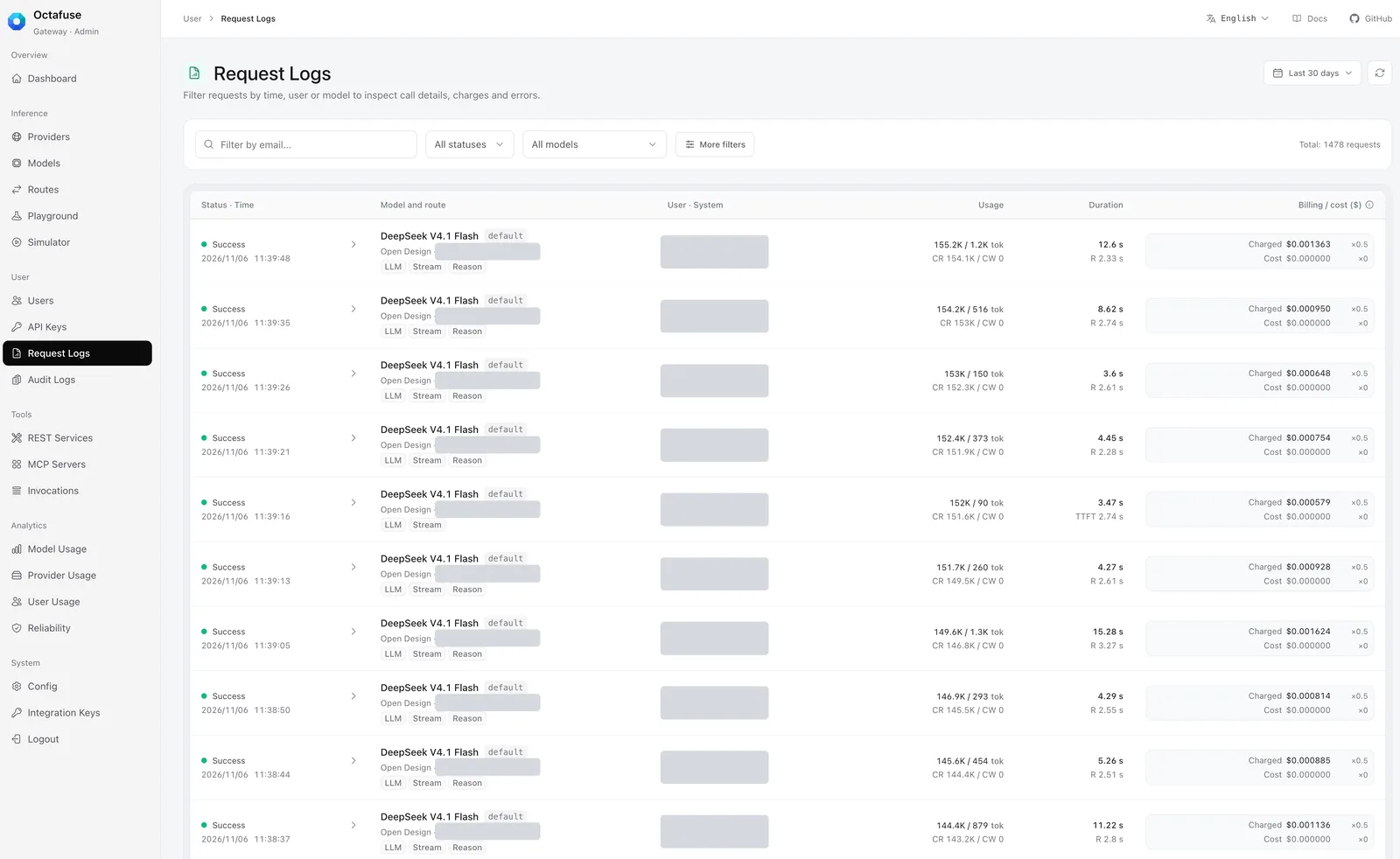
The Request Logs list. Common filters are on top and the other conditions are under More filters. The User · System column and provider accounts are covered.
04 | Fixes
Section titled “04 | Fixes”- Logs and queries: Fixed the default date in Request Logs, reloading after the time range is cleared, and the time boundaries when drilling down from historical errors. A stale query can no longer overwrite the current result. Also fixed invocation-record queries overwriting each other, MCP drill-downs losing their scope, and historical identity filters.
- State and errors: Fixed maintenance polling overwriting a value you had just saved, and the Simulator treating its automatically generated
task_idas a manual edit. REST Services and MCP Servers offer a retry when loading fails, and the OAuth settings cannot be written until they have loaded successfully. - Log compatibility: When an upstream returns an HTML error page, the list shows a summary and the full body stays in the request details. Audit details now tolerate missing snapshots and non-object extension data.
- Controls and dialogs: Dropdown arrows are aligned, and collapsible help now supports keyboard navigation. User activity details close properly and scroll correctly.
05 | Model and provider catalog
Section titled “05 | Model and provider catalog”Compared with 2.18.0, the catalog adds 23 model presets. Models you already imported are not overwritten, and importing does not attach routes. Import new models by hand and configure their routes.
Highlights
Section titled “Highlights”| Model | Notes |
|---|---|
| Claude Fable 5.2 | Adds claude-fable-5-2 (2026-11-09) with a 1M context, 128K max output, and text, image and file input. Standard list price is $8 input, $40 output, $10 for 5-minute cache writes and $0.20 for cache reads per million tokens; Fast mode and the Batch discount are not included. CNY prices are placeholders of the USD price × 7, so verify them before use. |
| Zhipu GLM-5V-Turbo | Adds glm-5v-turbo with a 200K context, 128K max output, and text, image, video and file input. CNY list prices have two tiers by input length: under 32K, ¥5 input, ¥22 output and ¥1.2 cache hit; 32K and above, ¥7, ¥26 and ¥1.8, all per million tokens. The vendor publishes no USD price, so the catalog has no USD price. |
| Tencent Hunyuan HY4 | Adds the stable hy4 (2026-11-04) with a 1M context, 64K max output and text and image input. On TokenHub it natively supports Chat, Responses and Anthropic Messages. List prices follow hy4-preview: ¥6 input, ¥18 output and ¥0.3 cache hit per million tokens. The limited-time 50% TokenHub promotion is not part of the catalog price. |
| GPT Image 2.6 | Adds gpt-image-2.6-flare and gpt-image-2.6-sunburst (2026-11-04), with the same list prices as GPT Image 2.5. CNY prices are the USD price × 7 as placeholders. They work only through the Images API and cannot be the primary model for Responses or Chat Completions. The new complexity field, the svg and gif output formats and the GIF frame fields are forwarded as extra fields; do not set them as route defaults. |
Other new presets
Section titled “Other new presets”| Vendor | New models |
|---|---|
| OpenAI | gpt-5.5-pro, gpt-5.4-pro, gpt-5.2-pro; speech recognition gpt-transcribe, gpt-live-transcribe, gpt-realtime-whisper; image gpt-image-1.5, gpt-image-1-mini |
Image gemini-3-pro-image, gemini-3.1-flash-lite-image | |
| Alibaba Cloud | Speech synthesis qwen-audio-3.1-tts-next, qwen-audio-3.1-tts-plus; embedding qwen3.7-text-embedding-flash |
| StepFun | step-5-preview, step-3.5-flash, step-1o-turbo-vision |
| Zhipu | glm-5.3-flashx-legal (a legal-domain serving SKU), glm-ocr (document and image parsing) |
See the model catalog for full specifications and prices.
Tencent Cloud TokenHub templates
Section titled “Tencent Cloud TokenHub templates”The pay-as-you-go template now uses the Guangzhou endpoint tokenhub.tencentmaas.com and supports Chat, Responses, Embeddings and Anthropic Messages. The personal Token Plan uses /plan/v3 and /plan/anthropic and now includes Responses. The general plan and the Hy plan share one address and the same sk-tp- key. The Singapore endpoint tokenhub-intl.tencentmaas.com must be configured separately.
Retirement dates and context fixes
Section titled “Retirement dates and context fixes”- Gemini 2.5:
gemini-2.5-proandgemini-2.5-flashnow carry the shutdown date the Gemini API publishes, 2026-12-01. From that day Google automatically reroutes requests togemini-3.8-flashandgemini-3.5-flash-literespectively, so review the related routes ahead of time. - Other retirement dates:
gpt-image-1.5andgpt-image-1-minion 2026-12-01 andqwen3.5-pluson 2027-01-19. Only official shutdown dates are recorded, and routing and billing are unaffected. - Context and max output: MiniMax M2.5, M2.7 and M2.7 Highspeed are now 200000.
hy4-preview, Doubao Seed 2.1 Pro / Lite (260915) and MiMo V2 Pro, V2.5 Pro and V2.5 are now 1000000. K means 1000 and M means 1000000.
06 | Other changes
Section titled “06 | Other changes”- Qwen-Audio speech synthesis:
dashscope-tts-qwen-audioand the DashScopeaudio.speechandaudio.speech.streampassthrough supportqwen-audio-3.1-tts-nextandqwen-audio-3.1-tts-plus. Preset billing is unchanged. - Command Code quota: Adds the monthly included credits. If the subscription or usage lookup fails, the balance and the 5-hour and weekly windows still display.
Upgrade notes
Section titled “Upgrade notes”Upgrading from 2.18.0 to 2.19.0 requires no database migration. When upgrading from an earlier release, still apply every migration that has not yet run.
- Update the Proxy, Admin and migrate images to the same version, then do a rolling restart.
- Afterwards, spot-check routes, request logs, the Playground and the Simulator to confirm that filters and navigation behave as expected in the new interface.
Also keep in mind:
- Admin entries: Maintenance mode and Integration Keys moved; see “Where things moved” above. The old maintenance address redirects to the new location.
- New catalog entries: Claude Fable 5.2, GLM-5V-Turbo, Hunyuan HY4, GPT Image 2.6 and the others must be imported by hand and given routes. Catalog updates do not overwrite models and providers you already imported.
- Gemini 2.5: From 2026-12-01 Google reroutes these models automatically. Review the related routes beforehand.
See GitHub Release v2.19.0 and the changelog for the full list.
If OctaFuse helps your project, please give it a Star on GitHub. Your feedback helps us keep improving routing, protocol support, and the self-hosted experience.