
OctaFuse 2.18.0: sign in to MCP with your own accounts, and manage sticky bindings
Published
OctaFuse Gateway 2.18.0 can offer the MCP servers on the gateway to another product. People do not paste an API key. They sign in with their own business account, approve access, and call those servers. Sticky routing can show the current assignment, change how long it lasts, and unbind someone by hand.
Streams no longer treat an upstream comment heartbeat as proof that the model has started writing. The catalog adds GPT-6.1 Terra and four regional templates for Baidu Cloud Model Service V2. Models and providers you already imported are not overwritten.
Let people reach MCP with their own account
Section titled “Let people reach MCP with their own account”Handing out an API key was the only way to let another product call MCP on the gateway. A key is hard to take back per person or per application, and it does not sit inside that product’s own accounts.
This release can use sign-in instead. You enter your own account system in Admin. When someone opens MCP in ChatGPT, Cursor, or a similar client, they are sent to that account system to sign in and approve. They can then call MCP on the gateway without pasting a key. The sign-in page stays on your system. The gateway does not keep their password.
Open MCP servers → Client access and authorization. Turn on OAuth 2.0 sign-in (optional), fill the authorization server address, and save. Leave it off and the API key path is unchanged. Use https. Local development can use http on localhost. Turn the switch off and save to stop this sign-in path.
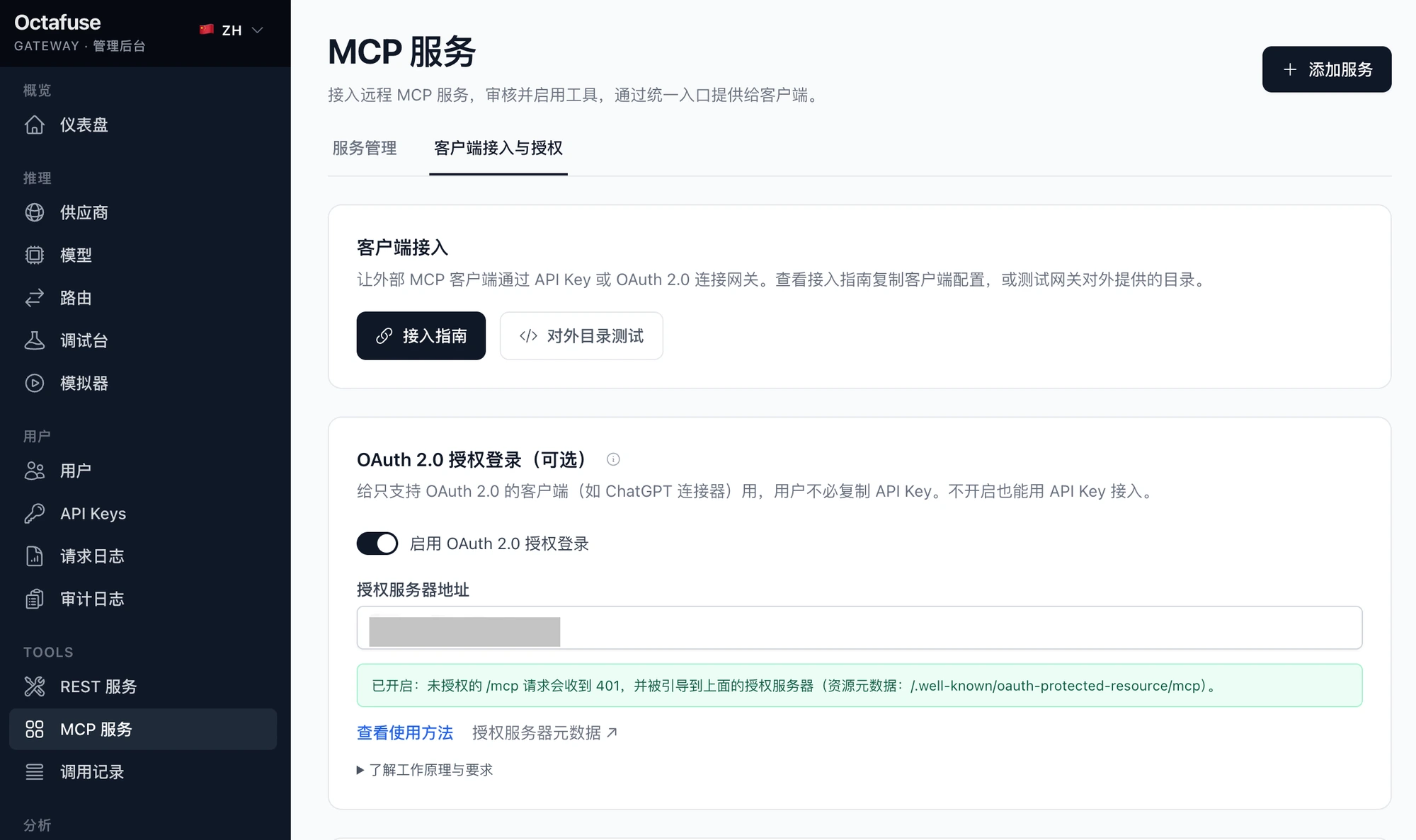
Sign-in is on. People connecting to MCP are sent to the business account system entered here. The address is covered.
Access granted this way can call MCP only. Using it for chat, the model list, or any other entrance is rejected. A grant lasts 1 hour by default. After it expires, or after you revoke it in Admin, the client asks the person to sign in again. The charge is recorded on the gateway user who approved it.
The connection guide on the same page switches between API key and OAuth sign-in. The OAuth steps cover the ChatGPT connector, Cursor, VS Code, Claude Code, and Codex, and they say whether the account system is configured.
Grants are listed under OAuth access tokens. You can look them up by application or by user, and revoke one. A user’s detail page shows which external applications that person approved. Request logs name the application.
A few call rules change with this:
- A client calls one tool at a time. Several calls packed into one batch used to skip the per-call rate limit.
- If the upstream tool result is not usable, the call is not charged.
- When a client asks which resource templates exist, the gateway answers. There are none yet, so the list is empty.
See who is sticky, then unbind them
Section titled “See who is sticky, then unbind them”Finding which provider a person was stuck to used to mean knowing the email and looking the binding up in reverse. Provider sticky is now one dialog on the route you are looking at. Under the title are that entrance’s model, protocol, and route group, for example Qwen3.7 Plus, OpenAI chat, and default, plus whether sticky is on.
The dialog has Settings, Distribution, Bindings, and Other.
Settings turns sticky on or off and sets how long a binding lasts: 1 hour (default), 2 hours, 6 hours, or a custom value. The same user, on the same model, route group, and protocol, prefers the provider that succeeded last time. After you save, the setting applies to every entrance on this route pool. You can discard edits that are not saved yet.
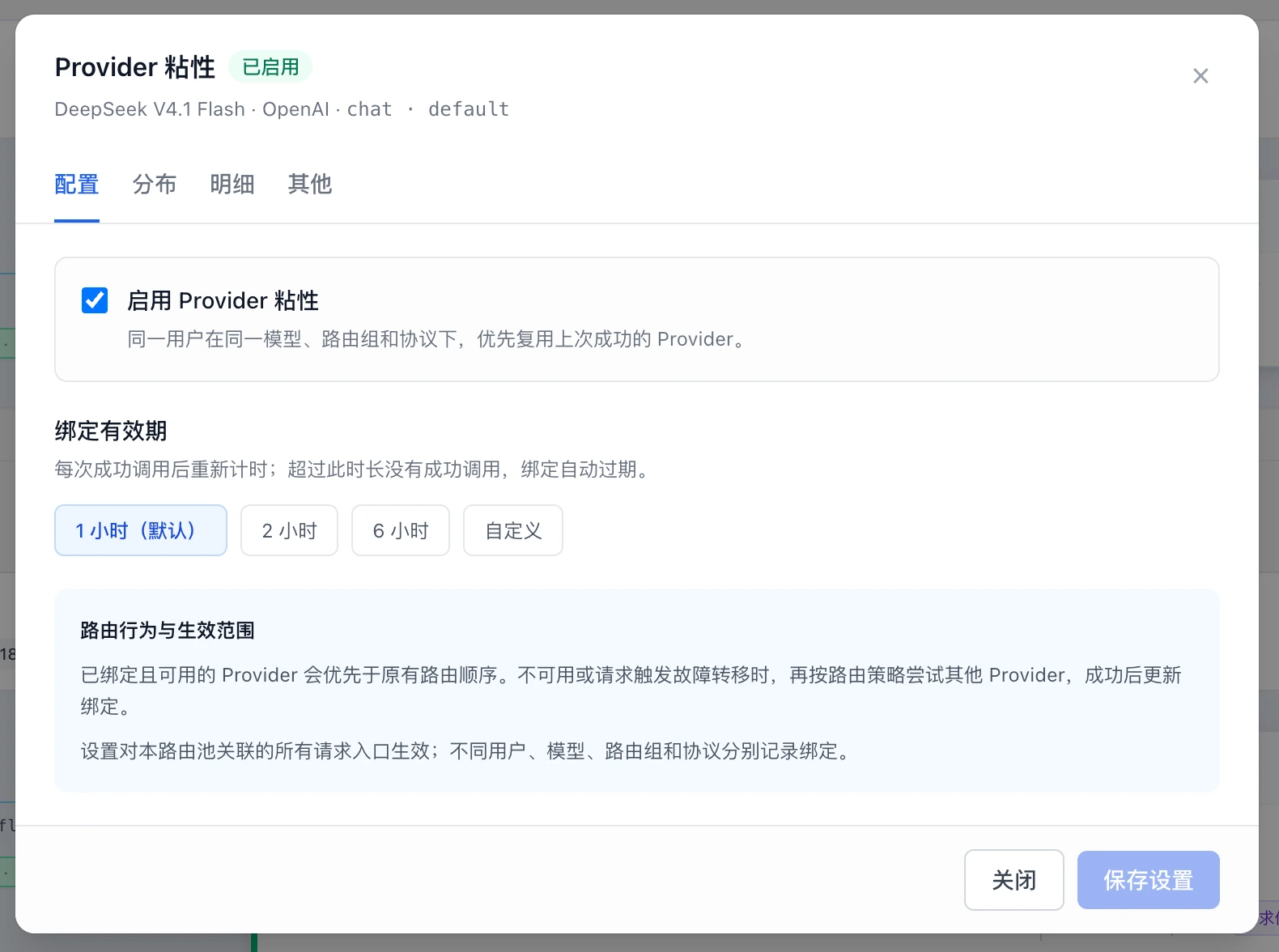
Settings for DeepSeek V4.1 Flash, OpenAI chat, default. Sticky is on, and the lifetime is 1 hour (default).
Distribution lists providers by priority, with weight, current binding count, and share of the pool. The count is not request volume, and one user can have more than one binding. The blue count opens Bindings filtered to that provider.
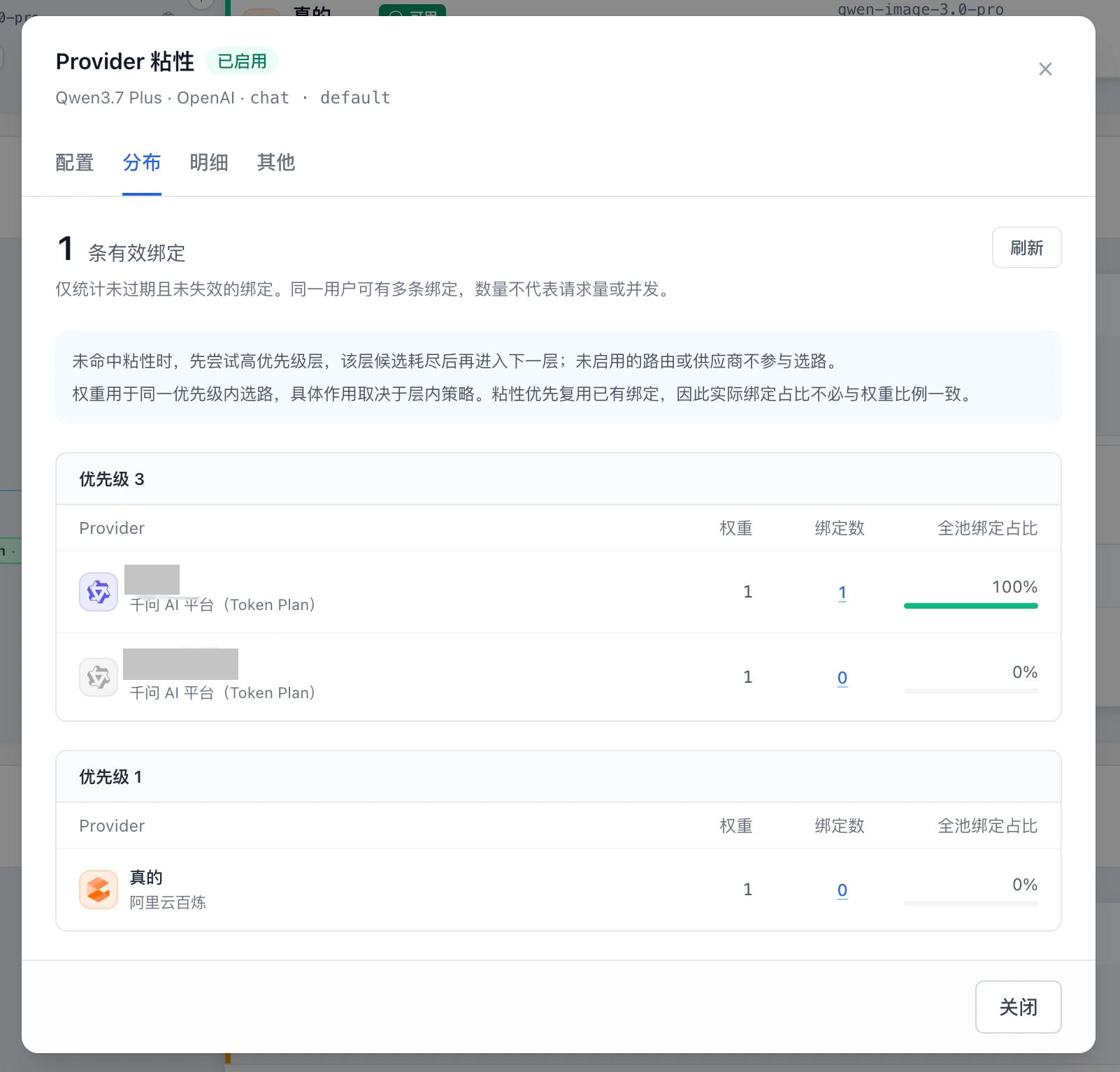
One active binding. That priority-3 row is 100% of the pool. The other row on the same tier, and Alibaba Cloud Model Studio at priority 1, are 0. Account names are covered.
Bindings lists bindings that are still active, most recently used first. Filter with the provider menu, or look up an email or user id. A lookup includes expired rows. Each row is the user, the provider, the time left, and Unbind. Unbind affects that one row. The next request picks a route again and may land on the same provider. Hover the time left to see the exact expiry.
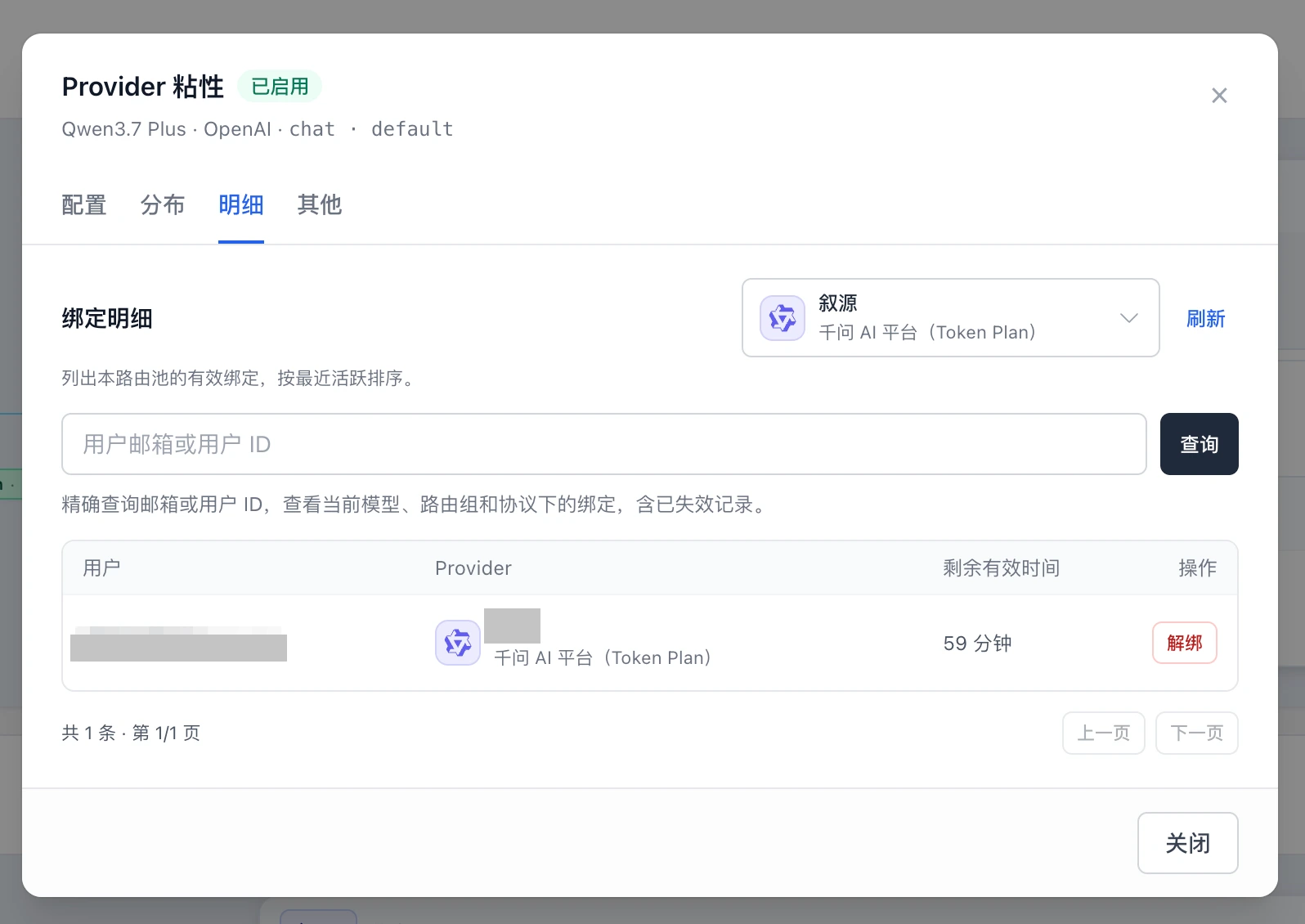
Filtered to Qwen AI Platform (Token Plan). This binding has 59 minutes left. The user and account name are covered.
Other expires every active binding in this route pool. The confirmation states how many. The sticky switch and the lifetime stay as they are. The next request picks a route again.
Bindings that already existed before the upgrade keep working. The user name is filled in on the next successful call. Until then the row says the user was not recorded. You do not backfill them yourself.
Streams, and the catalog
Section titled “Streams, and the catalog”Some upstreams send heartbeats for a long time before any text. Those requests used to sit for about 10 minutes. Only real content now counts as output. A heartbeat no longer extends the wait.
If about 60 seconds pass with no useful content, the gateway tries the next provider. On the last provider it keeps waiting for the first byte, so the call is not failed early. The same handoff happens when the response headers never arrive. The caller sees a failure only after every candidate has failed. Set STREAM_FIRST_EVENT_TIMEOUT_MS to 0 to turn that early handoff off. With no route groups named, the timeout applies to every route group. A deployment that had tried it only on default will see a wider range after the upgrade.
A Gemini chat that fails because a previous thought signature does not match is retried once against the same upstream after those signatures are cleared. Other failures are returned as before.
Failover logs name which provider was tried, why it failed, and whether another candidate remains. The error the caller sees is unchanged.
The route list uses stacked or side-by-side panes as the width allows. A wide layout keeps name, model, and the configuration summary together, and puts status, weight, sticky, and parameters on their own.
| Catalog change | Notes |
|---|---|
| GPT-6.1 Terra | gpt-6.1-terra. Standard short context is $1 input and $5 output per million tokens, cache read $0.05, 30-minute cache write $1.25. Above 272K input, the whole request uses the long-context price: input $2, output $7.5, cache read $0.10, 30-minute cache write $2.50. CNY is a USD × 7 placeholder. Import it, then attach a provider and a route. |
| Baidu Cloud Model Service V2 | Guangzhou, Singapore, California, and Frankfurt. These are separate from Baidu Qianfan, and regional keys must not be mixed. Guangzhou is chat only: OpenAI Chat, Responses, and Anthropic Messages. The other three also include image generation and edit, plus Gemini text and image with Bearer auth. No embeddings, audio, or video. An imported provider is not rewritten. |
Upgrade to 2.18.0
Section titled “Upgrade to 2.18.0”Apply migrations 0034 and 0035. 0034 adds a nullable affinity_key on sticky bindings. 0035 creates oauth_access_tokens and adds a nullable oauth_access_token_id on request logs. D1, Postgres, and MySQL match. See the 0034 notes and the 0035 notes.
- Back up the database.
- Run the v2.18.0 migrate image, or apply 0034 and then 0035 by number.
- Roll Proxy and Admin to the same version.
Until 0034 is applied, a new process fails the sticky write. The request is still routed, but that call does not record a binding. Until 0035 is applied, a new process fails the request-log write. An older Proxy and Admin can run against the migrated database.
Compatibility:
- With no authorization server filled in, MCP still uses an API key. Sign-in is not required.
- MCP calls one tool at a time. A batch of several calls is no longer accepted.
- When the first-event route-group list is empty, the timeout applies to every route group. A deployment that had tried it only on
defaultgrows after the upgrade. Set the timeout to0to turn it off. - Existing sticky bindings stay valid. The user is filled in when a later successful call renews the binding. Until then the row says the user was not recorded.
- Imported model prices and providers are not overwritten. Import GPT-6.1 Terra and the Baidu Cloud templates yourself, and attach routes.
See GitHub Release v2.18.0 and the changelog.
If OctaFuse helps your project, please give it a Star on GitHub. Your feedback helps us keep improving routing, protocol support, and the self-hosted experience.