
OctaFuse 2.9.0: user and key rate limits, custom upstream headers, and a clearer Admin
Published
When the same person reaches OctaFuse from a website, an Agent, and a scheduled job, the gateway has to do more than forward the request. You need a cap on that person and on each application, some providers expect extra headers, and operators need a faster way to see traffic and failures.
OctaFuse Gateway 2.9.0 adds two rate-limit layers, custom upstream headers, per-key usage, and the host the request actually arrived on. The dashboard, usage views, and save or delete feedback are updated with them. Existing applications keep their request URLs and credentials.
In one sentence:
Cap a user and each API key separately, attach the headers a provider requires, and find traffic or failures faster in Admin.
Limit a user and each API key
Section titled “Limit a user and each API key”One user often has more than one API key. A limit on a single key does not cap the person. A limit only on the person lets one runaway application use the whole allowance.
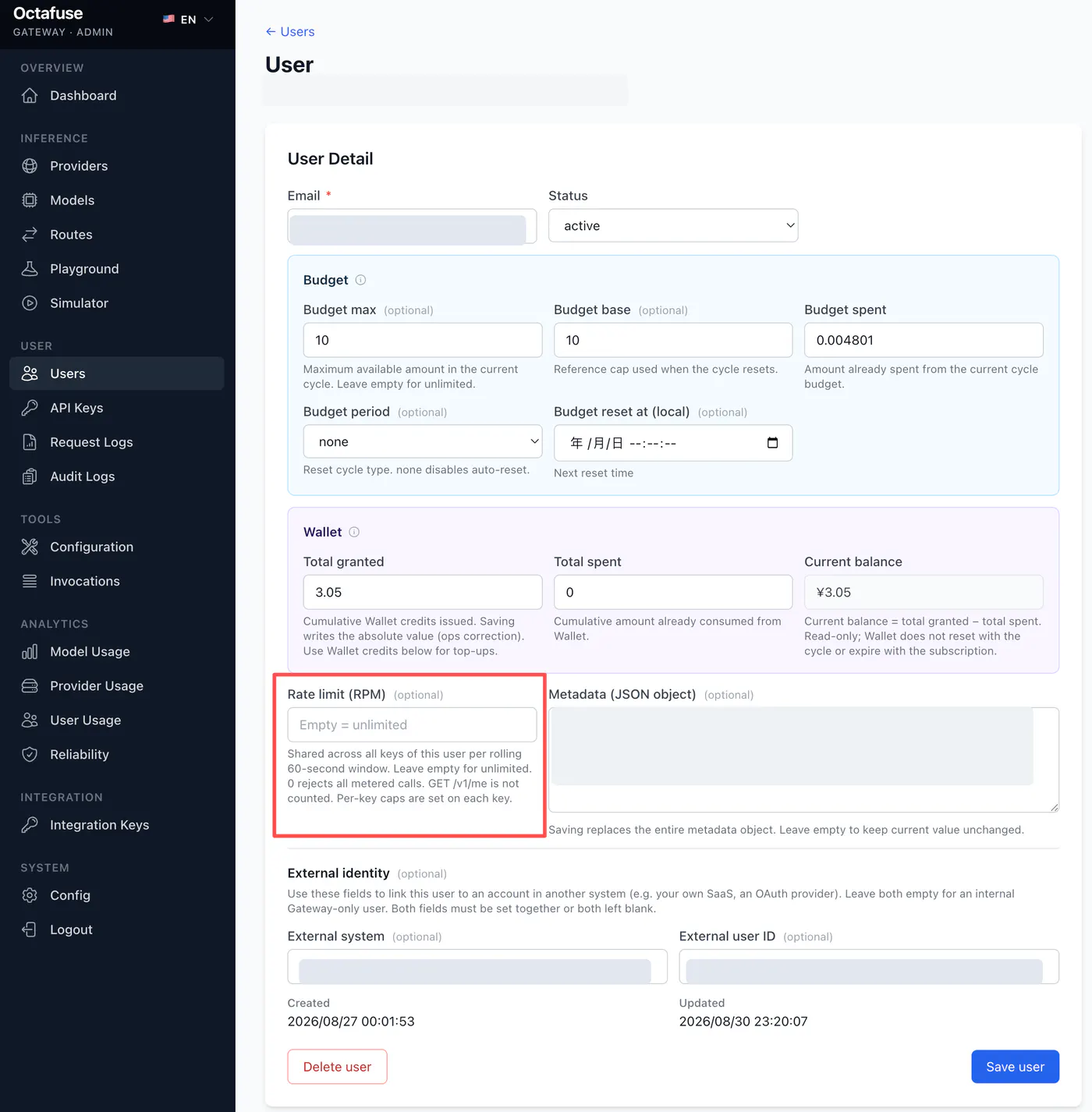
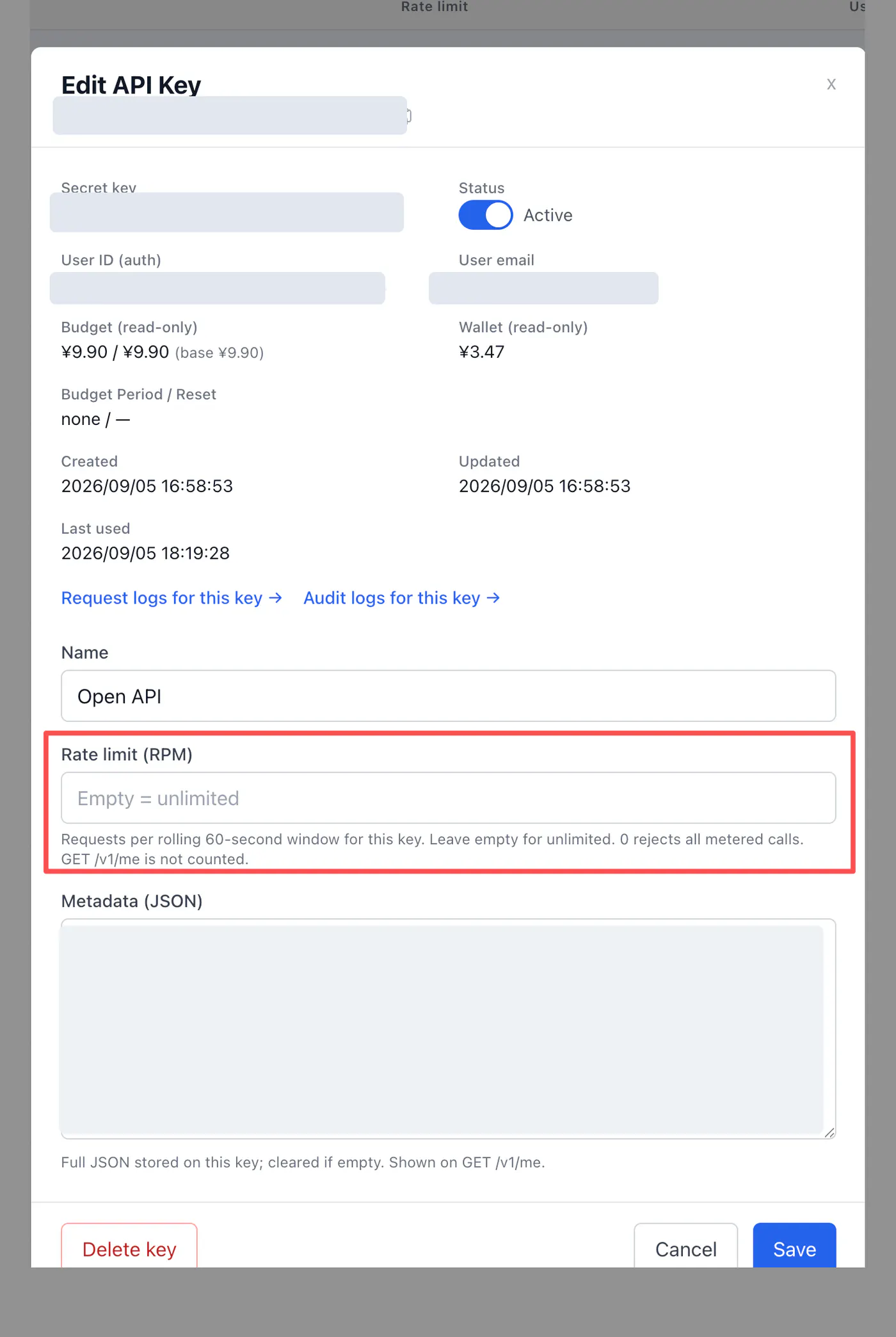
2.9.0 adds two independent RPM limits:
- User RPM counts every API key belonging to that user over the last 60 seconds.
- Key RPM counts only the key on the current request.
You might set the user to 120 RPM, the website key to 80 RPM, and the automation key to 30 RPM. No key can pass its own cap, and the keys together cannot pass the shared user cap.
Leave a field empty for no limit. 0 rejects every counted request. Any other value must be a non-negative integer. The window is the previous 60 seconds, not the calendar minute.
When a request is over the limit, the gateway returns:
429 gateway.rate_limitedRetry-After: <seconds>Clients can wait for Retry-After before retrying. GET /v1/me is not counted, so a limited key can still read its balance.
Set the user cap on the user detail page. The user list shows that cap. Set each key on the API Keys page. Admin and the Admin API both reject negative numbers and decimals.
Rate limits answer how often something may call. Usage answers where the calls came from. A new Admin endpoint groups usage by API key:
GET /api/admin/analytics/keys ?user_id=<USER_ID> &start_date=<START> &end_date=<END>Each key returns request count, tokens, user charges, provider cost, success rate, model count, and last activity. Model analytics also accept api_key_id. Request logs can be filtered by the same id, and each log stores the ingress host, the domain the request actually hit. That host is for observation when one Proxy serves production, test, and other entrances. It is not an allowlist and does not control access.
A successful usage write also updates the key’s last_used_at, so unused keys are easier to spot.
Send the headers a provider expects
Section titled “Send the headers a provider expects”Some providers want a fixed HTTP header in addition to the API key. OpenRouter, for example, may use HTTP-Referer for the site and X-Title for the application name.
Each route can now carry those headers. Add the name and value in the route editor, and the gateway sends them upstream.
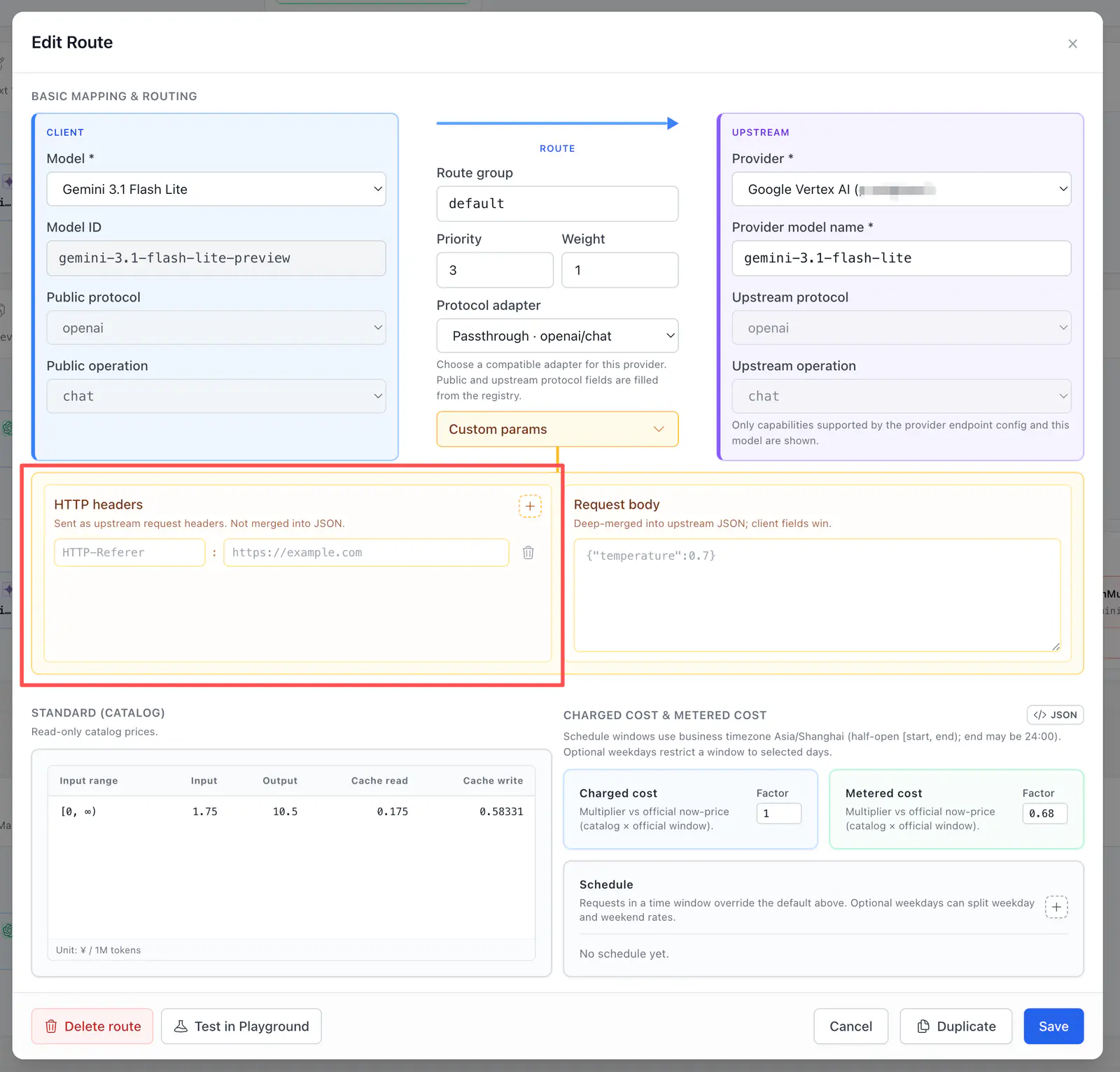
Headers on the left are sent as HTTP headers. Parameters on the right merge into the upstream JSON body. They do not cross over.
In the Admin API these values live in custom_params.headers. They stay HTTP headers and are not copied into the JSON body.
The gateway still owns authentication and transport headers. A route cannot override Authorization, X-API-Key, X-Goog-API-Key, Host, Content-Type, Content-Length, Cookie, or connection-management headers.
Body defaults, such as temperature, are a separate setting. If the client sends the same field, the client value wins. Body defaults cannot enforce a maximum.
After you save, Playground’s actual upstream request shows the final headers and body. Custom headers are marked, and secrets such as the API key are redacted.
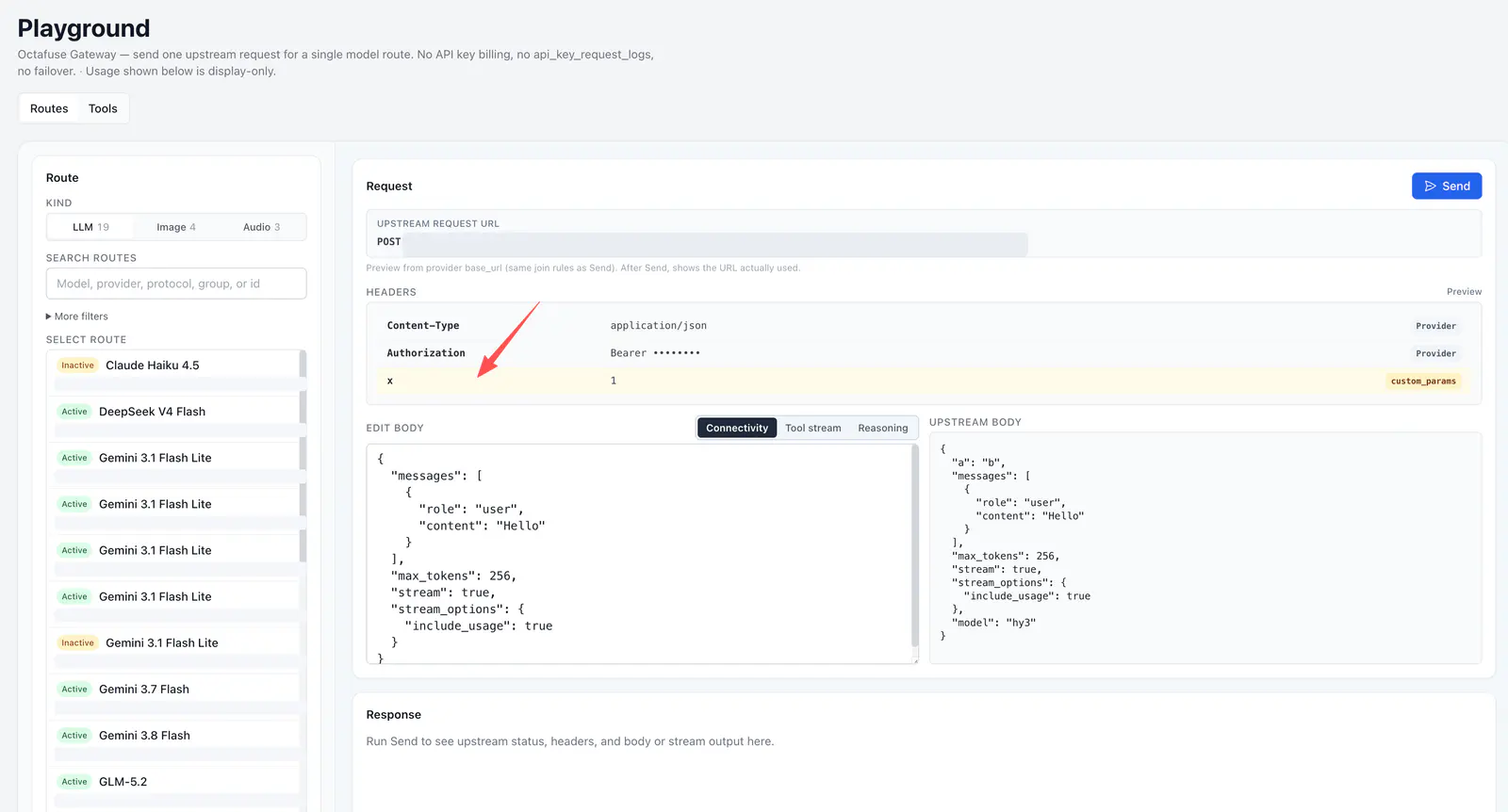
Custom headers from custom_params are marked. Authentication is redacted, and the final upstream body is shown beside them.
A dashboard you can scan first
Section titled “A dashboard you can scan first”The dashboard now puts request volume, success rate, average latency, user charges, trends, top models, active users, recent requests, and errors on one page. From there you can open model, provider, user, or reliability views.
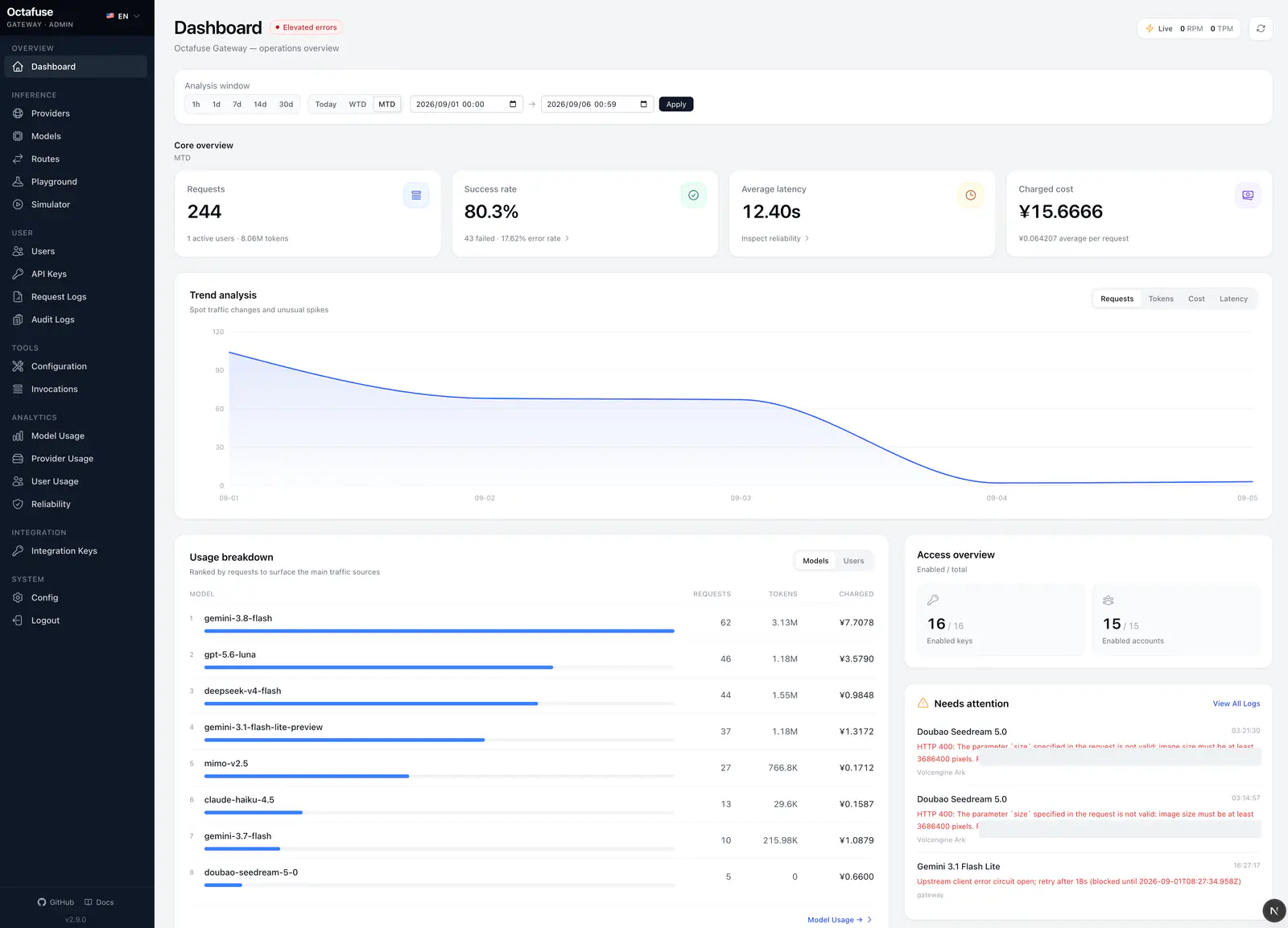
Core operating numbers and the traffic trend, with preset or custom time ranges.
Model, provider, and user usage pages can keep several detail rows open at once. Save, delete, and error feedback uses in-page notices and confirmations instead of browser dialogs.
Other changes
Section titled “Other changes”| Area | What changed |
|---|---|
| Providers | A SiliconFlow international template, kept separate from the China site. Import and edit screens link to the platform home or API key page. |
| Catalog | Adds gemini-3.8-flash, weekday peak windows for DeepSeek V4 Pro and V4 Flash, and corrected USD and CNY preset prices for 23 Alibaba Cloud Model Studio models. |
| Price display | When several routes share the same priority and weight, the catalog shows the lower combined factor. Request routing itself is unchanged. |
| Cloudflare | PROXY_CUSTOM_DOMAIN and ADMIN_CUSTOM_DOMAIN accept a comma-separated list. Blank entries are ignored, duplicates are removed, and a single domain still works. |
| Node / Docker | Creating or editing an integration key behind a reverse proxy is no longer rejected as a cross-site write. Real cross-site writes are still rejected. |
| Billing logs | Chat, Responses, Anthropic Messages, and Gemini share one structured billing record. The amounts you are charged do not change. |
| Image edits | A single reference image is sent as image. Several images are sent as image[]. |
Importing the catalog does not overwrite models or providers already in the database. Import again, or edit by hand, when you want a new model, the international template, or a corrected price.
Upgrade to 2.9.0
Section titled “Upgrade to 2.9.0”This release includes migration 0028. It adds rate-limit settings on users and API keys, an ingress host on request logs, and the matching indexes. D1, PostgreSQL, and MySQL use the same fields.
- Back up the database.
- Run the 2.9.0 migrate image, or the matching command, and apply 0028.
- Roll Proxy and Admin to 2.9.0.
- Check the user RPM, the key RPM,
Retry-After, and thatGET /v1/mestill works while limited. - Check the ingress host,
last_used_at, and filtering by key. - Confirm custom headers in Playground, then smoke-test Chat, Responses, Messages, Gemini, Images, and Audio.
The new columns are nullable. Users and keys with no rate_limit stay unlimited. You can keep the new columns if you roll the application back.
The rate-limit window lives in each Proxy process, or each Cloudflare isolate. It is not stored in the database. A single Node process is close to exact. Multiple processes, replicas, or isolates do not share the window, so the cap is soft. A restart starts the window over. A hard global limit still needs a shared counter.
Before upgrading, review GitHub Release v2.9.0 and the full changelog.
If OctaFuse helps your project, please give it a Star on GitHub. Your feedback helps us keep improving routing, protocol support, and the self-hosted experience.