
OctaFuse 2.8.0: dual quota balances, unified protocol adapters, and peak/off-peak pricing
Published
OctaFuse Gateway 2.8.0 improves several workflows that matter when you deploy the gateway yourself: combining subscriptions with top-ups, choosing the right protocol conversion for a route, exposing Alibaba Cloud Model Studio image models through OpenAI Images, testing realtime speech in Admin, and presenting peak/off-peak prices clearly.
Most existing applications can keep their current request URLs after the upgrade. The main changes are in Admin and billing, where operators can configure quotas, routes, and prices more directly, while portals can read the current and upcoming price windows from the model list.
In one sentence:
Use subscription allowances and top-up balances together, configure protocol conversion without guesswork, and make image, audio, and time-based pricing easier to operate.
One user can have both a subscription allowance and a top-up balance
Section titled “One user can have both a subscription allowance and a top-up balance”Services built on OctaFuse often need two kinds of credit: an allowance that resets with a monthly or team plan, and top-up credit that remains available until it is spent. Version 2.8.0 stores them separately so both can be enabled at the same time.
| Balance type | Typical use | Resets with a billing period |
|---|---|---|
| Recurring quota | Monthly subscriptions, team limits, or periodic promotional credit | Yes — daily, weekly, or monthly |
| Permanent balance | Top-ups, prepaid credit, signup bonuses, or refunds | No |
Gateway spends the recurring quota first, then uses the permanent balance for any remainder. If a user’s current subscription has 3 units left, their top-up balance has 20, and one request costs 5, OctaFuse deducts 3 from the subscription and 2 from the top-up balance.
This also means a user can continue calling the gateway after the recurring quota reaches or resets to zero, as long as the permanent balance is still positive. Chat, image, audio, and Agent Tool requests all use the same combined balance check.
User Details now shows the recurring quota separately from the total granted, total spent, and current permanent balance. Existing plan settings continue to manage the recurring quota. When a payment or top-up succeeds in your own portal, use the new credit endpoint:
POST /api/admin/users/:id/wallet/credit{ "amount": 50, "kind": "topup", "external_ref": "order-20260830-001"}Set external_ref to the payment order number or another stable business reference. Repeating the same callback for the same user and reference does not credit the balance twice. Admin can still correct the absolute permanent balance manually, but normal purchases should no longer increase the recurring budget_max value.
Request Logs and Audit Logs record how much of a charge came from each balance, making subscription usage, top-up spending, and periodic resets easier to reconcile.
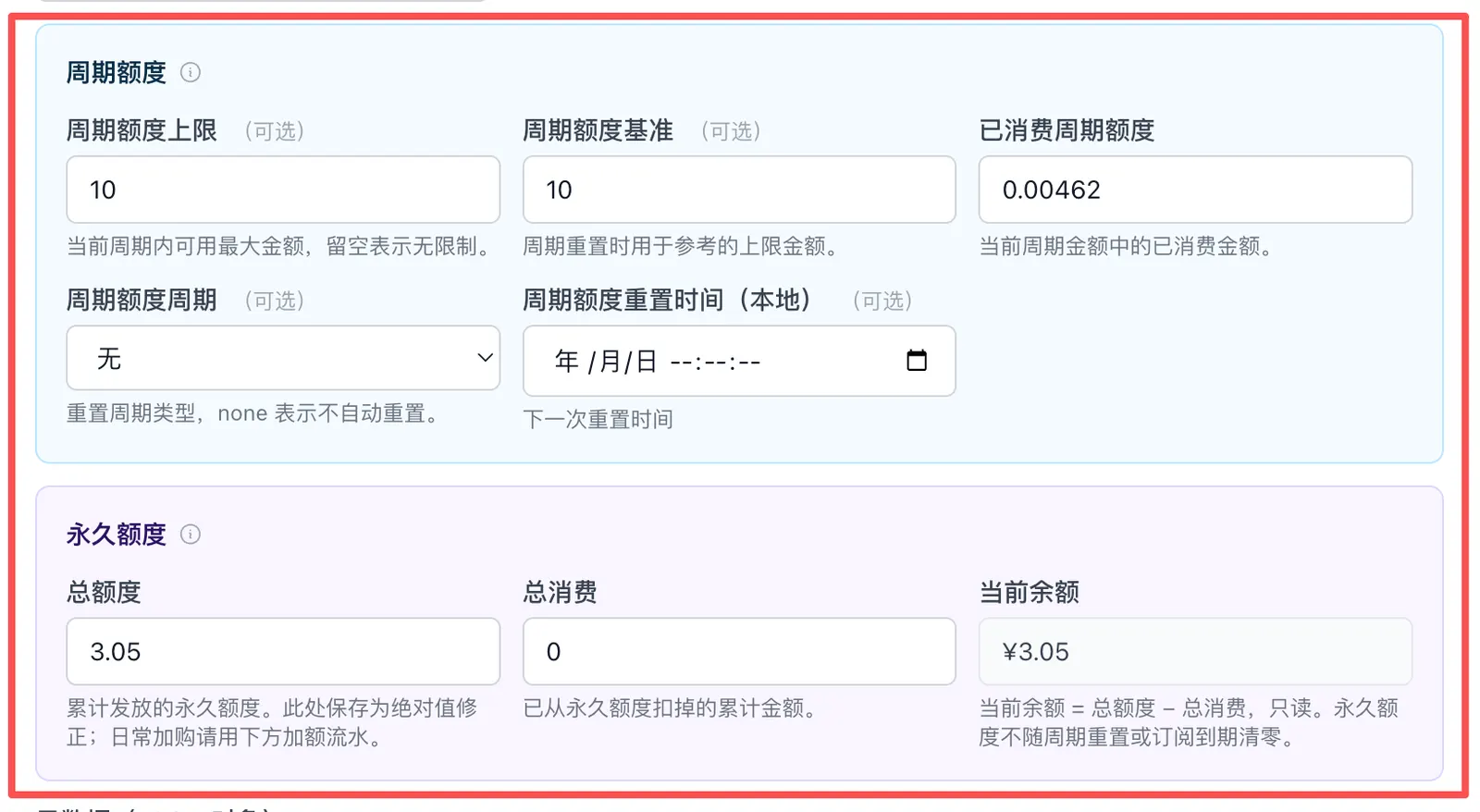
Recurring quota can reset daily, weekly, or monthly. Permanent balance does not reset with a subscription period, while both balances participate in the same request eligibility check.
Choose a route adapter without guessing how protocols fit together
Section titled “Choose a route adapter without guessing how protocols fit together”Every route has two sides: the protocol an application uses to call OctaFuse, and the protocol OctaFuse uses to call the Provider. A client can use OpenAI Images, for example, while the upstream route uses the native Alibaba Cloud Model Studio image API.
Version 2.8.0 organizes these mappings as protocol adapters. When creating or editing a route in Routes:
- Select the client-visible model.
- Select the Provider that will serve the request.
- Choose an available adapter that describes client request → actual upstream.
- Review the client protocol and operation, plus the upstream protocol and operation filled in by Admin.
- Test the individual route in Playground, then test the complete Proxy path in Simulator.
Admin filters out mappings that do not match the selected model and Provider endpoints. This reduces the chance of saving a route only to discover later that its protocols are incompatible. Future image, audio, video, or vector adapters can follow the same configuration model.
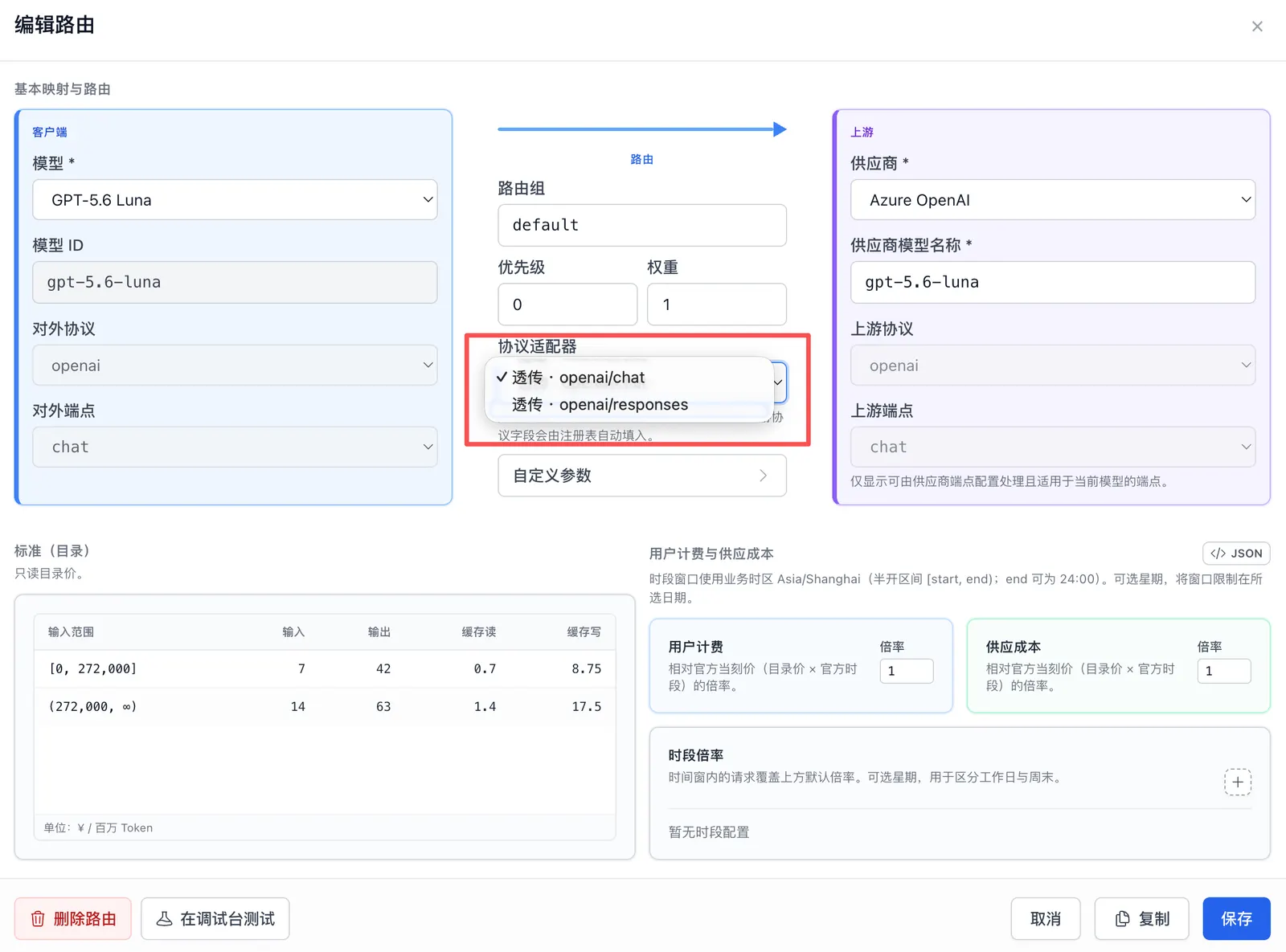
Selecting an adapter fills the matching client and upstream protocol fields. In this example, the same OpenAI model can expose either a Chat or Responses request surface.
Call four Model Studio image models through OpenAI Images
Section titled “Call four Model Studio image models through OpenAI Images”Qwen Image 3.0, Qwen Image 3.0 Pro, Wan 2.7 Image, and Wan 2.7 Image Pro entered the model catalog in 2.7.0, but at that point they could only use native DashScope requests. Version 2.8.0 adds conversion from the OpenAI Images request format to the Model Studio image API.
After configuration, existing applications continue to call:
POST /v1/images/generationsOctaFuse converts the request and response internally:
| Models | Client request surface | Route adapter | Actual upstream capability |
|---|---|---|---|
| Qwen Image 3.0 / Pro | OpenAI image generation | dashscope-image-qwen | DashScope multimodal image generation |
| Wan 2.7 Image / Pro | OpenAI image generation | dashscope-image-wan | DashScope multimodal image generation |
A recommended setup order is:
- Import the required Qwen or Wan image model from the model catalog.
- Confirm that the Model Studio Provider has a multimodal image-generation endpoint.
- Create a route and select
dashscope-image-qwenfor Qwen, ordashscope-image-wanfor Wan. - Use Playground to confirm that the selected Provider route returns an image.
- Use Simulator with an OpenAI Images request to test the user key, routing, billing, and request log together.
Applications do not need to implement the native DashScope request format or use the Provider’s real endpoint directly. A normal OpenAI-compatible request still works:
{ "model": "qwen-image-3.0", "prompt": "A lighthouse by the sea in watercolor style", "n": 1, "size": "1024x1024"}Qwen supports 1–6 images in one request, while Wan supports 1–4. If n is omitted, OctaFuse requests one image by default, preventing Wan’s upstream default from unexpectedly generating four images and increasing the charge.
Responses return image URLs by default. Set response_format=b64_json when Base64 output is required. Billing uses the number of images actually returned, and Qwen Image Pro selects its 1K or 2K price from the image type reported by the upstream response.
Some Model Studio plans cannot derive the image endpoint from their base URL. If no compatible adapter appears, or Playground reports that the image endpoint is unavailable, explicitly configure images.generations.multimodal on the Provider first.
Test realtime speech directly in Node or Docker Admin
Section titled “Test realtime speech directly in Node or Docker Admin”Node and Docker deployments can now test DashScope realtime speech recognition directly in Playground. Open Inference → Playground, select a realtime audio route, and then:
- Choose the browser microphone as the input source.
- Allow microphone access in the browser.
- Start recording and watch the connection state and transcript.
- Stop the session when the test is complete.
Playground checks one Provider route without debiting a user balance or writing a request log. After the upstream route works, use Simulator with a real user key to verify authentication, Route Pool selection, billing, and logging through the full Proxy path.
Simulator already supported realtime audio. This release improves its default microphone selection, raw PCM upload, and route matching. Proxy also handles realtime connection setup and abnormal closure more reliably, reducing the chance of losing audio or events at the start of a session.
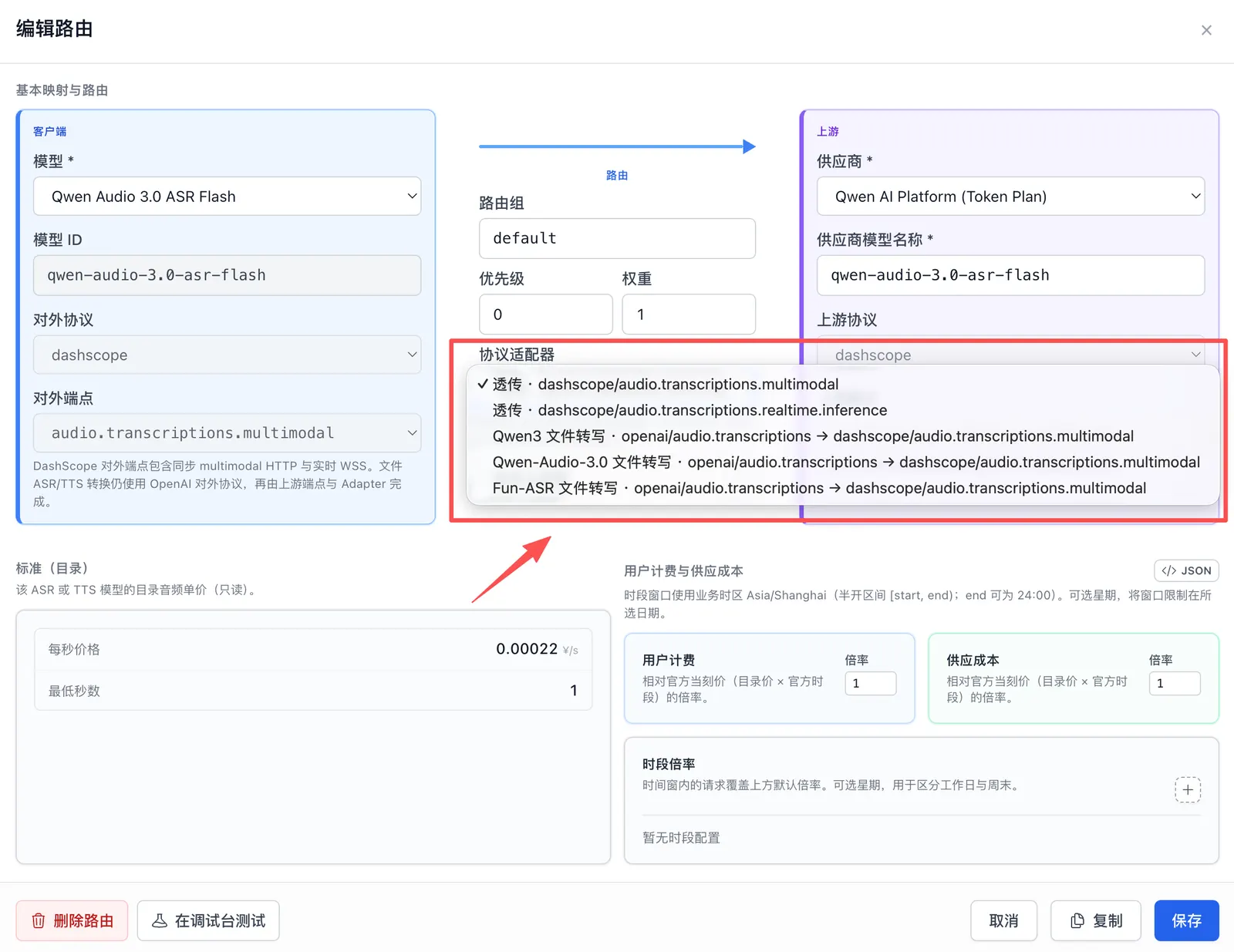
Available adapters come from the endpoints configured on the Provider. The same audio model can use native DashScope passthrough or convert an OpenAI file-transcription request to DashScope multimodal ASR.
Configure the Provider schedule separately from the price users pay
Section titled “Configure the Provider schedule separately from the price users pay”A Provider’s official peak/off-peak schedule and an operator’s discount or markup are different layers. Version 2.8.0 stores the official schedule on the model, while routes keep their own user-charge and upstream-cost factors.
The effective route price can be understood as:
Catalog standard price × model official schedule factor × route effective factor
Configure the layers in this order:
- Add the Provider’s official peak/off-peak windows and factors to model pricing.
- Set the route’s default Charged and Metered factors.
- If the selling price should also change by time, enter the corresponding factor in the same route windows.
- Review the calculated prices before saving, including weekdays and the gaps between peak windows.
When a model has an official schedule, routes reuse the same start times, end times, and weekdays, and only define route-specific factors. This keeps the Provider’s peak period and the route’s peak period aligned. Routes can still define their own time windows when the model has no official schedule.
Portals calling /v1/models or the public /catalog/models endpoint can read the effective factor for each route group, upcoming windows, and the business timezone. A model selector can therefore show the price that applies now and when the next price starts, without reimplementing schedule evaluation in the portal.
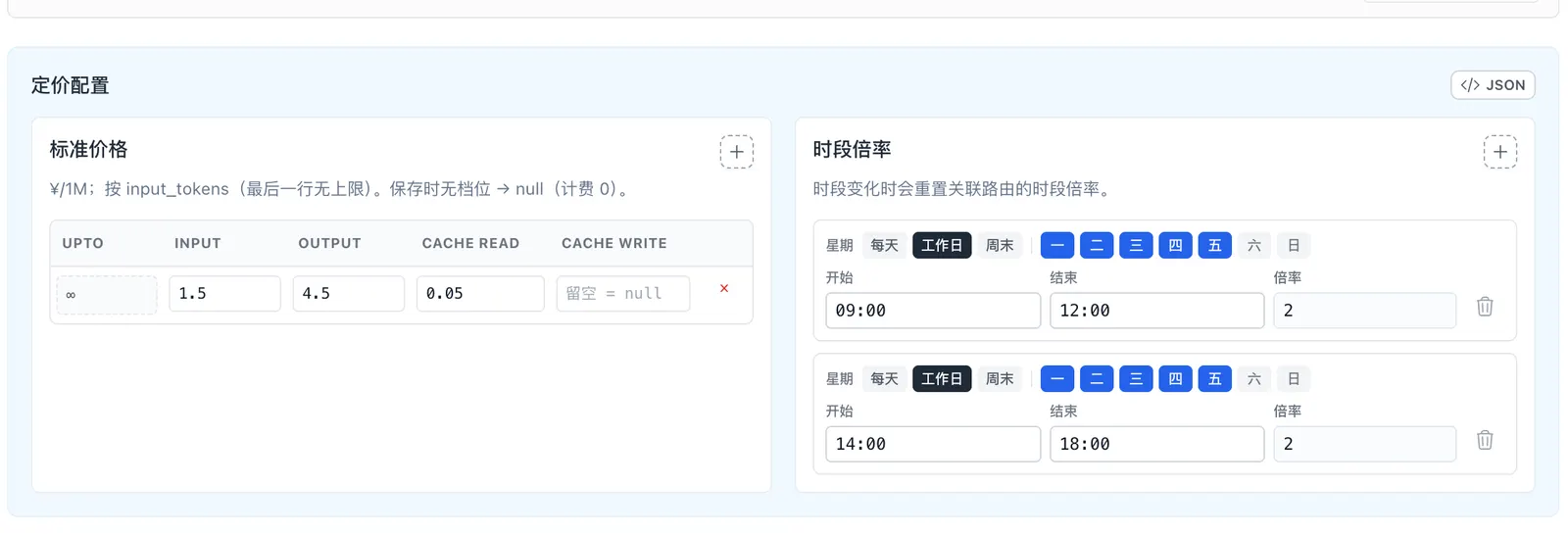
DeepSeek V4 Flash stores the off-peak rate as its catalog standard price. The official factor is 2 during 09:00–12:00 and 14:00–18:00 on weekdays; all other times use the standard off-peak price.
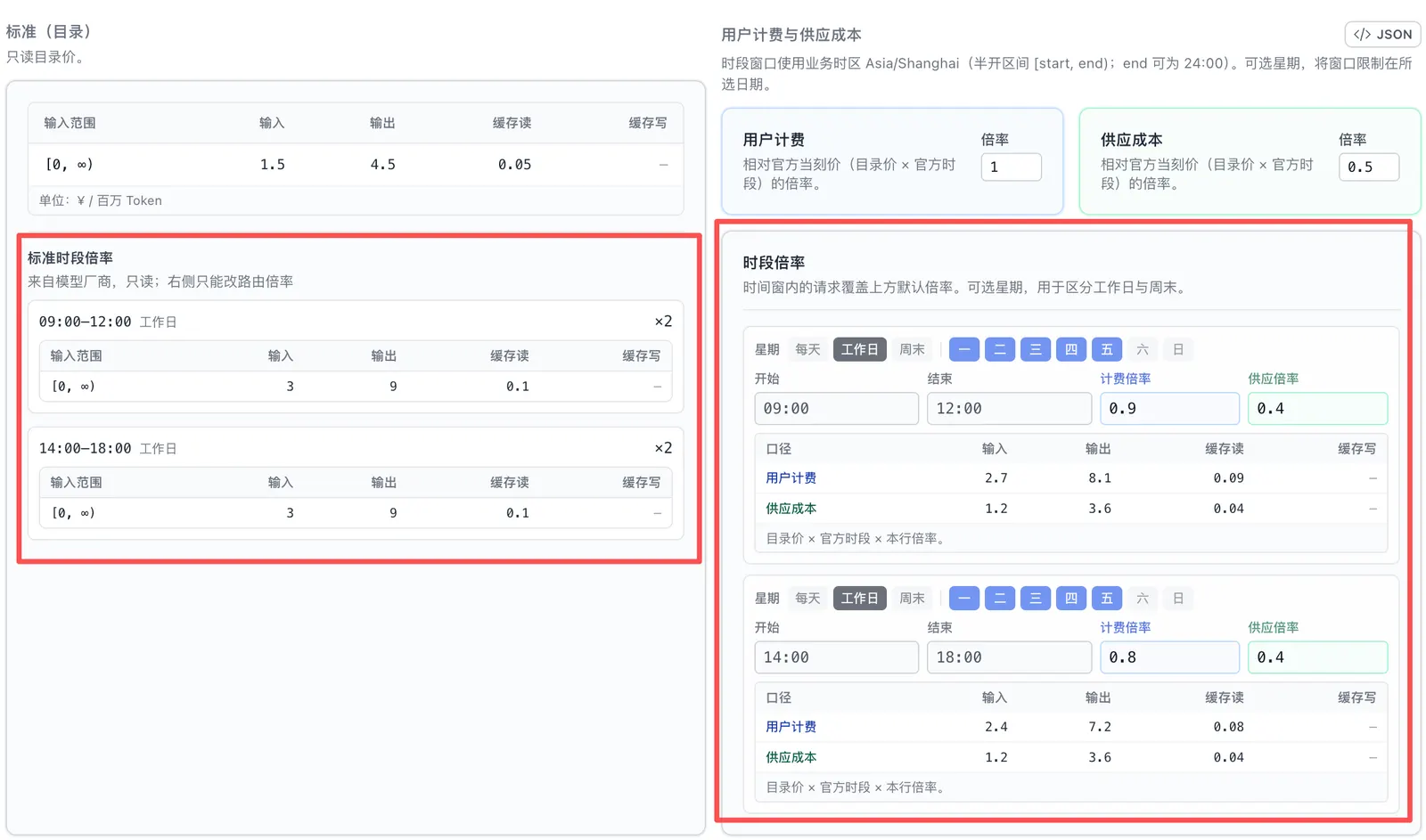
The left side shows the model catalog’s official schedule as read-only prices. The right side configures user-charge and upstream-cost factors and previews the effective price for every window.
Other everyday improvements
Section titled “Other everyday improvements”Version 2.8.0 also includes several smaller Admin and catalog updates:
- New model presets:
hy4-preview,qwen3.8-flash, andglm-5.3-flash. - Catalog imports no longer write
model_tagsautomatically; operators can add tags after import based on Provider, plan, or workload. - Later static catalog updates do not overwrite model rows that have already been imported into the database.
- Existing Chat, Messages, Gemini, Audio, and Responses client surfaces remain unchanged, so applications do not need to change their request format for this protocol-adapter update.
Upgrade to 2.8.0
Section titled “Upgrade to 2.8.0”This release includes database migration 0027 for D1, PostgreSQL, and MySQL. It adds the permanent-balance fields, duplicate-credit protection, and permanent-balance request-log fields, then moves eligible historical remaining credit into the new balance.
Proxy and Admin in 2.8.0 read the columns added by migration 0027 directly. Do not connect the new services to a database that has not been migrated. Schedule a maintenance window and upgrade in this order:
- Run the repository’s read-only 0027 audit script, review which historical balances will move, and back up the database.
- Pause Gateway requests and Admin writes that change user balances.
- Run the migrate job to apply migration 0027.
- After migration completes, immediately deploy and start the 2.8.0 Proxy and Admin together. Do not run old and new service versions at the same time.
- Verify the services and migrated balances, then switch the portal to
POST /api/admin/users/:id/wallet/creditand stop issuing purchased credit by increasingbudget_max.
After upgrading, verify the paths your deployment actually uses:
- Recurring quota and permanent balance are separated as expected, including historical balance migration.
- Repeating the same
external_refdoes not credit a user twice. - The recurring quota is spent first, with the permanent balance covering any remainder.
- Route adapters show the expected client-to-upstream mapping, and Qwen or Wan images return and bill correctly through OpenAI Images.
- Docker Admin can open a realtime microphone session, and Simulator can route microphone or PCM input correctly.
/v1/modelsand/catalog/modelsreturn the expected current factor, future windows, and timezone.- Existing Chat, Messages, Gemini, Images, Audio, and Responses requests still work.
Before upgrading, review GitHub Release v2.8.0 and the full changelog.
Summary
Section titled “Summary”Version 2.8.0 is especially useful for teams that deploy OctaFuse as a shared or customer-facing service. Recurring quota can represent subscriptions, permanent balance can represent top-ups, route adapters make protocol conversion visible, and official Provider schedules can remain separate from the prices users actually pay.
The same release lets four Model Studio image models reuse OpenAI Images and allows Node or Docker Admin to validate realtime speech recognition directly. Most existing applications can keep their current request format; the main upgrade work is reviewing quotas, routes, and price schedules.
If OctaFuse helps your project, please give it a Star on GitHub. Your feedback helps us keep improving routing, protocol support, and the self-hosted experience.