
OctaFuse 2.12.0: provider accounts, a route workspace, and multimodal model discovery
Published
More models and providers means more hunting: which account still has quota, which routes use a model, and which endpoint a new model expects. Doing that from a phone used to mean fighting the layout.
OctaFuse Gateway 2.12.0 puts account names, quota checks, and route search in Admin, returns image and audio endpoints from the model list, and makes the common Admin tasks usable on a narrow screen.
Name each provider account
Section titled “Name each provider account”When one platform has several accounts, routes, Playground, and logs need to show which one you mean. Pick the provider type and an alias. In the screenshot, two ZenMux accounts are Production and Testing. The alias only has to be unique inside that type, so another platform can reuse the same word. Importing the platform again creates another account and adds a number if the alias is taken.
Changing the type or alias does not require the API key again. The editor hides the key until you choose to view or copy it.
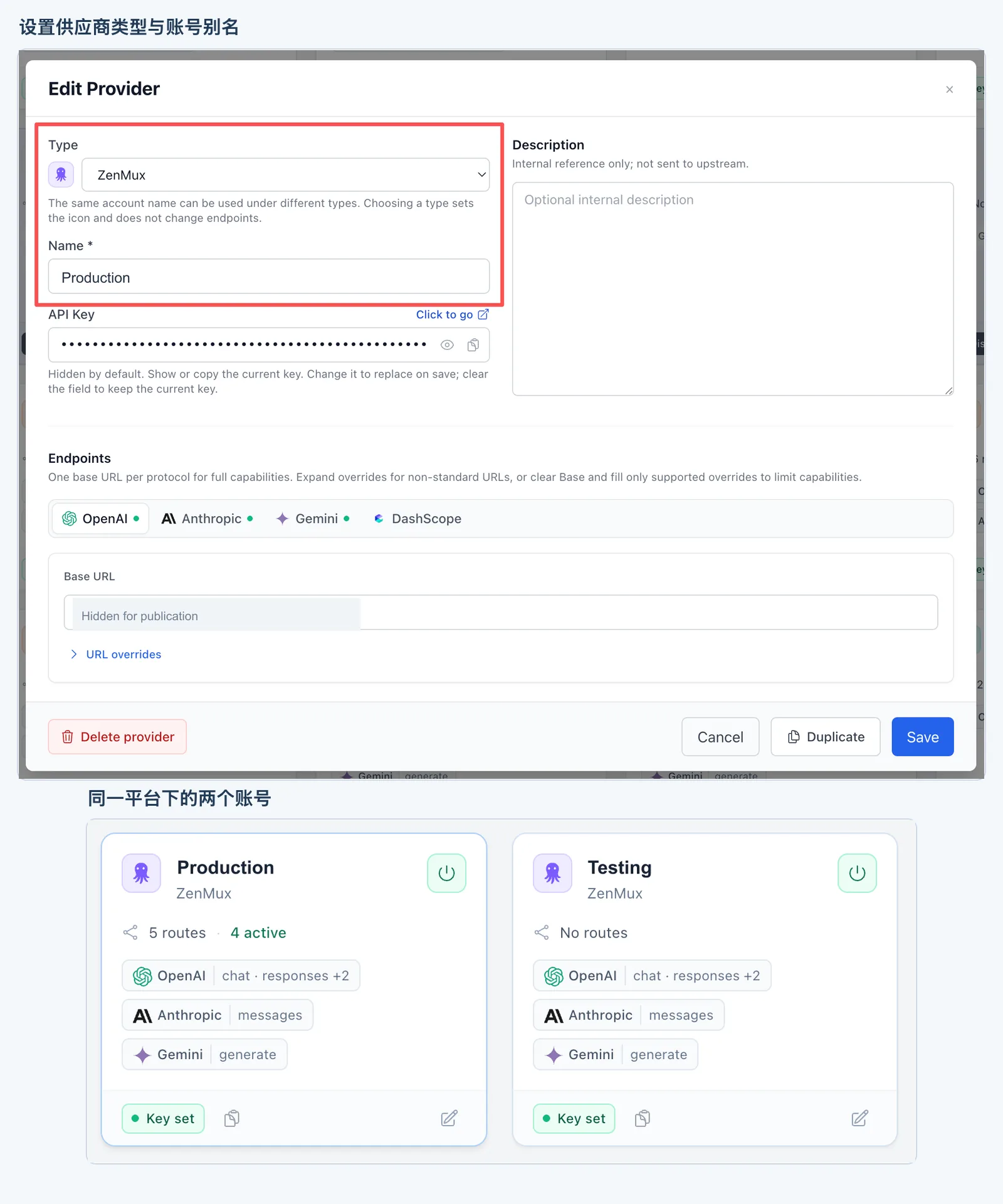
Two ZenMux accounts, Production and Testing. The aliases in the image are examples, the endpoint is covered, and the API key stays hidden.
Check quota without leaving Admin
Section titled “Check quota without leaving Admin”If calls start failing, open Quota on the provider card. For a supported platform, the right type and a valid key are enough to read the result on this page.
Pay-as-you-go accounts can show a balance. Plan accounts may show a 5-hour, weekly, or monthly window and when it resets, depending on what that platform returns. The result is read live from the upstream and is not stored in the gateway database.
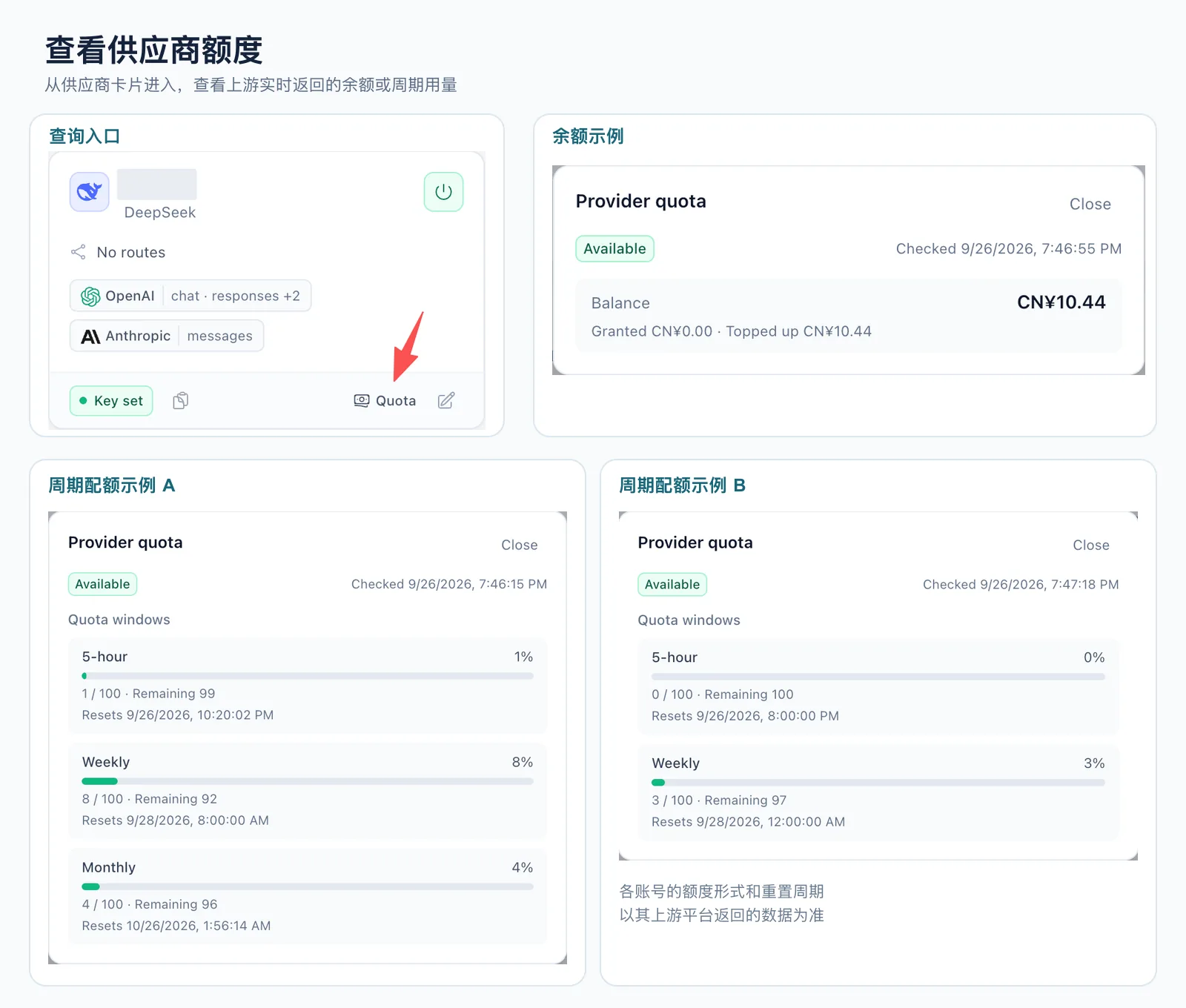
Open quota from the card to see a balance or a usage window. Account aliases in the image are covered.
The first set of platforms is DeepSeek, Moonshot AI, SiliconFlow including the international site, OpenRouter, Novita AI, DeepInfra, StepFun, Vercel AI Gateway, OpenCode Go, MiniMax Token Plan, and the GLM Coding Plan on Zhipu and Z.AI.
Find the route, then see who is sticky
Section titled “Find the route, then see who is sticky”Search routes by model, upstream model name, or provider. Filter by provider type when you want one platform. Switch between compact and detailed density. The browser remembers that choice.
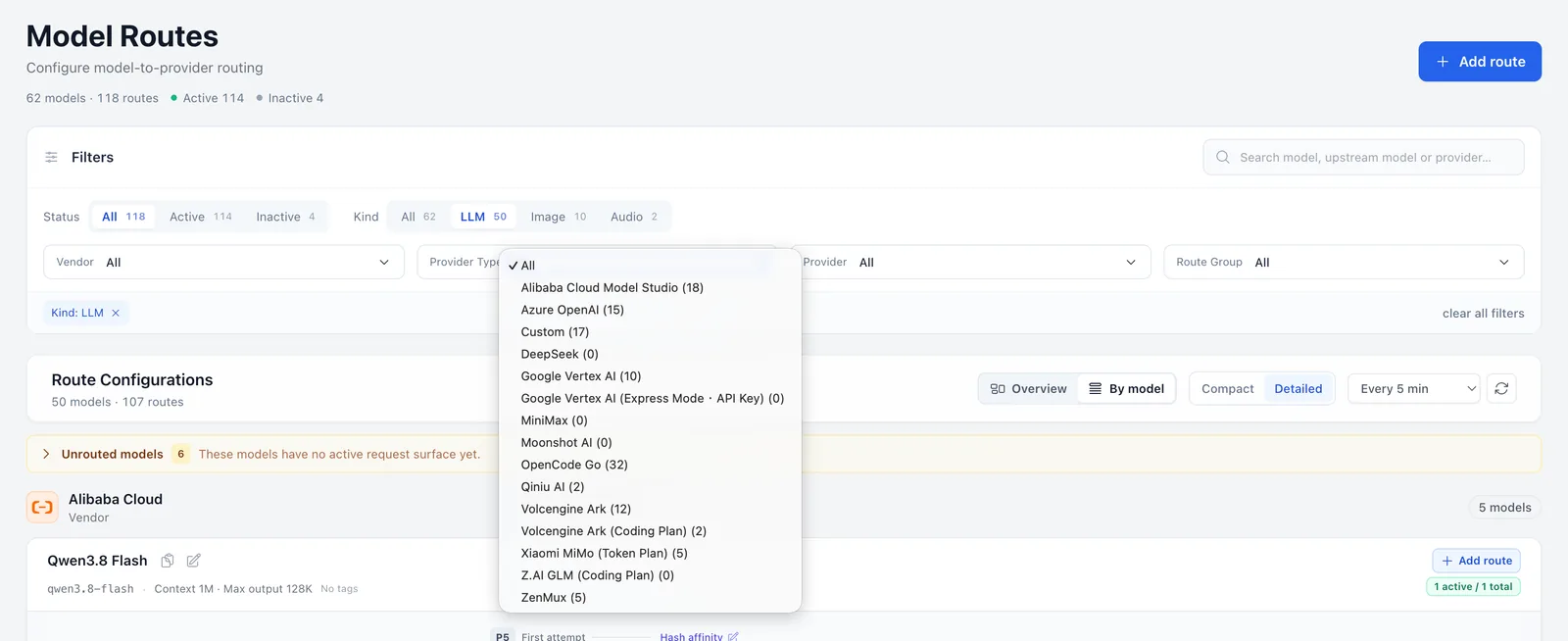
LLM is the current filter. The provider-type menu is still on All. Search and density sit on the right.
With sticky routing on, the route-group label shows how many bindings are active, and each target shows its own count. Hover for that target’s share of the group. Disabling a route that still has unexpired bindings leaves a reminder. The count is bindings, not online users, concurrency, or request volume.
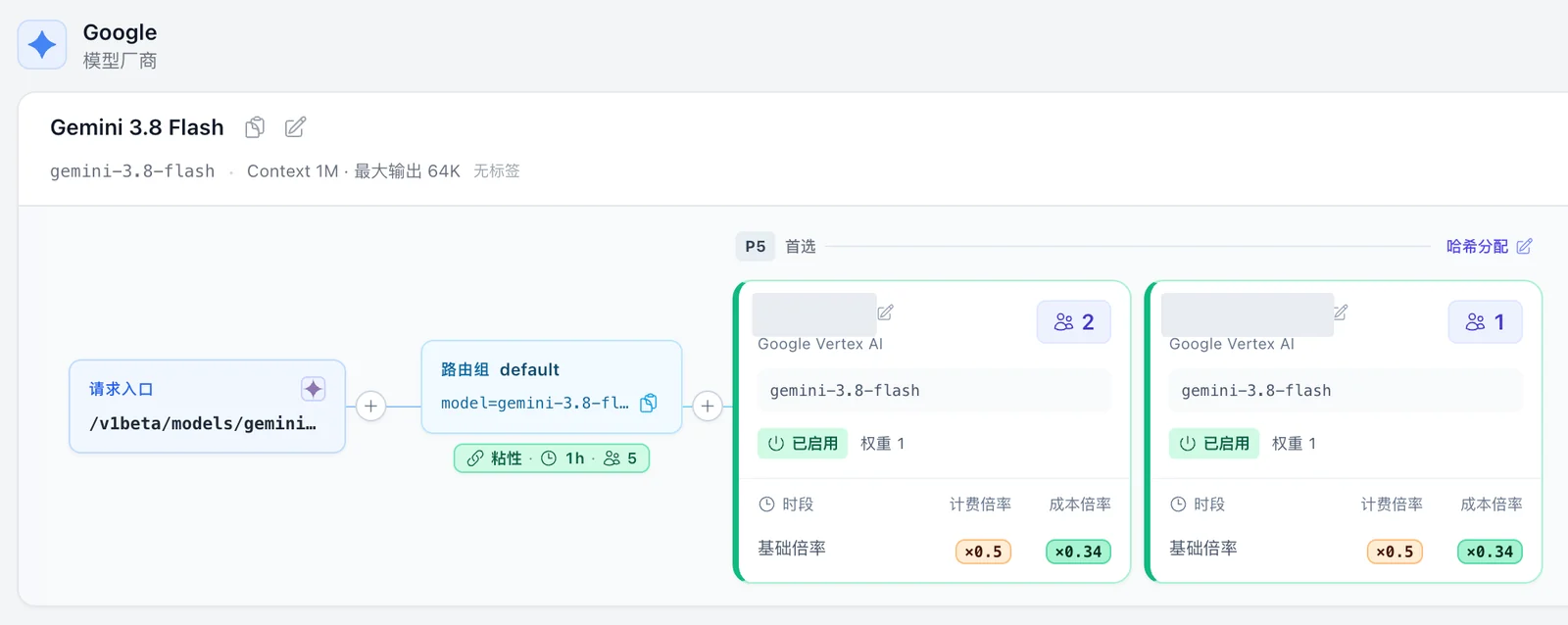
Sticky lifetime is 1 hour. Binding counts are on the group and on each target. Account aliases are covered.
Tell clients which image or audio endpoint to call
Section titled “Tell clients which image or audio endpoint to call”2.10.0 already listed text endpoints on GET /v1/models. 2.12.0 adds image generation, image edit, transcription, and speech, and GET /catalog/models returns the same inbound shape. A client reads protocol and operation and picks an endpoint it implements.
A speech model can look like this, with other fields omitted:
{ "id": "example-tts", "model_info": { "inbound": [ { "protocol": "openai", "operation": "audio.speech" } ] }}openai plus audio.speech means POST /v1/audio/speech. A portal can label that model as speech without guessing from the name. The list comes from active routes in the visible route groups. Order is not a ranking.
Image and audio lists need a kind: kind=image, kind=audio, or kind=all. Omit it and the list is still text only.
Refreshing the model list no longer spends user or API key RPM. A key that is rate-limited or out of balance can still read the list, as long as the key itself is valid.
Use Admin on a phone
Section titled “Use Admin on a phone”Narrow screens now keep navigation in a side menu and tuck secondary filters away. You can check status, change a common setting, and open Playground or Simulator when you need to.
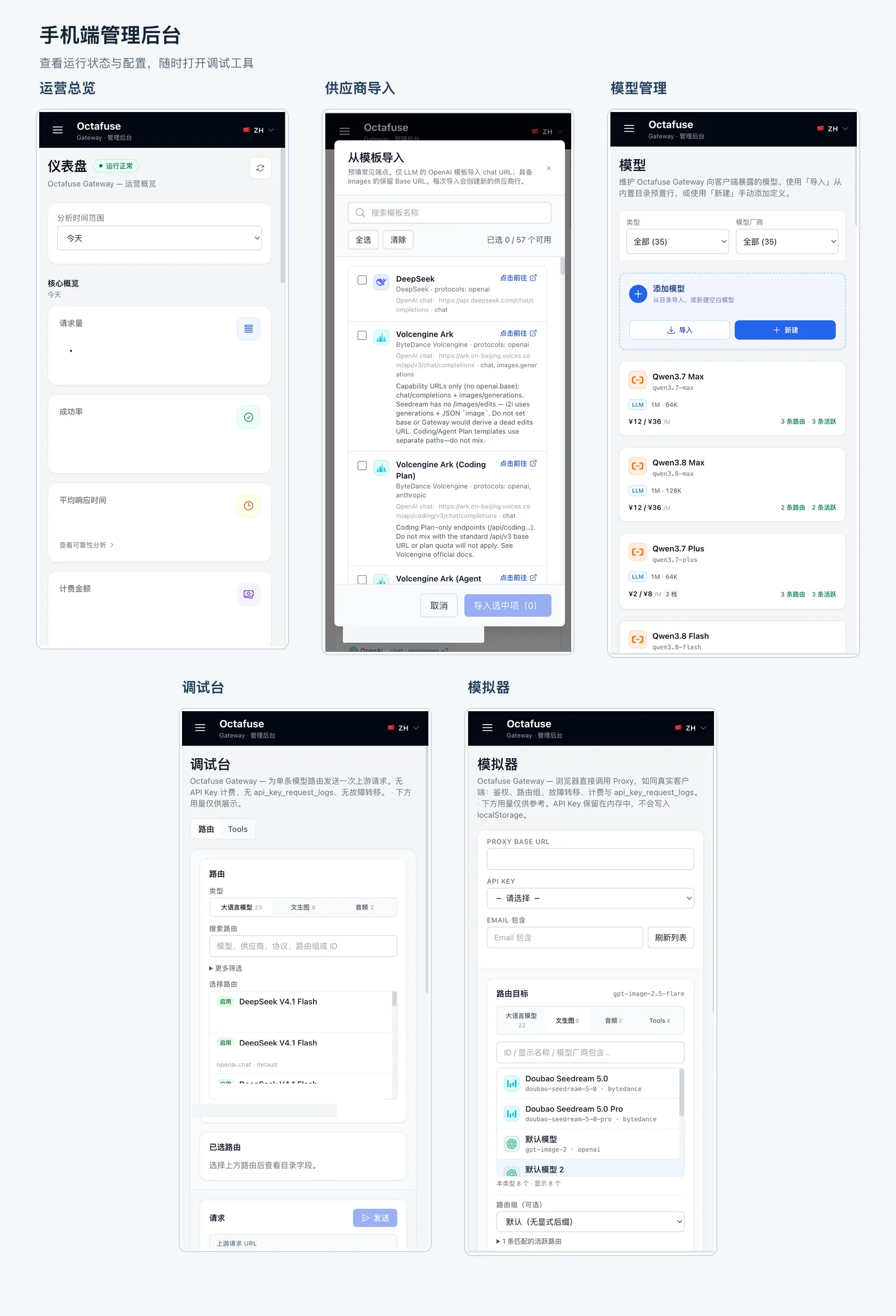
Five everyday phone screens. Accounts, domains, key fragments, and operating numbers are covered.
Other changes
Section titled “Other changes”| Area | What changed |
|---|---|
| Streaming debug | Playground and Simulator scroll the result pane, not the whole page, while a stream arrives. |
| Long streams | After output starts, the default idle wait between upstream chunks rises from 30 seconds to 90 seconds. |
| Model info | model_info.pricing_profile is an object or null. An empty vendor is returned as other. |
| Gemini examples | Provider endpoint examples no longer show a broken placeholder. |
| New presets | mimo-v2.6-pro, mimo-v2.6-flash, mimo-v2.6-pro-ultraspeed, gpt-6-sol, gpt-6-luna, claude-opus-5-5, and grok-4.7. |
Import a preset and attach a route when you want the model. Presets include USD and CNY prices. Import does not overwrite an existing model id.
Upgrade to 2.12.0
Section titled “Upgrade to 2.12.0”Back up the database, apply migration 0029_provider_kind, then update Proxy and Admin to 2.12.0. On D1 the migration rebuilds and copies provider, route, and sticky-binding tables. Avoid writes while that runs.
After the upgrade:
- Existing routes keep working, but accounts stay unclassified until you edit them and pick a type. Quota checks need that type and a valid key.
- If you always
JSON.parsemodel_info.pricing_profile, read the object directly and handlenull. - A configured
STREAM_IDLE_TIMEOUT_MSstill wins. If it is unset, the new default is 90 seconds.
Then try a quota check, a route filter, one model-list endpoint, and one long stream.
See GitHub Release v2.12.0 and the changelog.
If OctaFuse helps your project, please give it a Star on GitHub. Your feedback helps us keep improving routing, protocol support, and the self-hosted experience.